
Creating a Target Design from 3D Designs
In an HFSS, Q3D, or Maxwell 3D design, Create Target Design automatically generates and inserts a thermal design (Icepak or Mechanical Thermal) into your project.
To create a target design from an existing
- Click
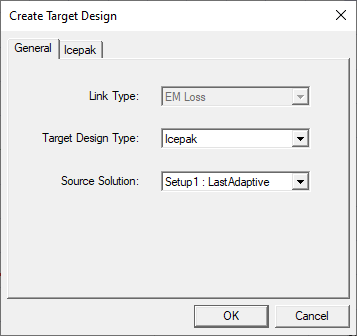
The Create Target Design window appears.
-
Select the Target Design Type to be created.
-
Select the Source Solution to specify the solution data to be linked to the target design.
-
For Icepak designs, specify Forced Convection or Natural Convection on the Icepak tab.
-
For Forced Convection, specify Flow Speed and Flow Direction.
-
For Natural Convection, specify the Gravity Vector Direction.
-
-
Click OK.
The Icepak design is generated based on the source design and selections in the Create Target Design dialog box:
Model geometry is created with corresponding material assignments. Vacuum objects are not created in target Icepak designs.
Any assigned materials that do not contain thermal properties are assigned default thermal properties in Icepak.
The Region (computational domain) is created with the appropriate dimensions.
An EM loss excitation is assigned to the geometry, and variable mapping and intrinsic variables are linked to the source design.
Design settings are specified.
Solution type: Steady State
Problem type: Temperature and Flow
For forced convection simulations, the following are defined:
A free opening boundary condition with a velocity specified is assigned to the Region face to create forced flow.
A free opening boundary condition is assigned to the face of the Region opposite to the opening with velocity specified.
In the Icepak Solve Setup dialog box, forced convection Solve Setup Defaults are defined.
For natural convection simulations, the following are defined:
Gravity Vector
Free opening boundary conditions are assigned to each face of the air Region.
In the Icepak Solve Setup dialog box, natural convection Solve Setup Defaults are defined.