Using Datasets to Define Transient Parameters
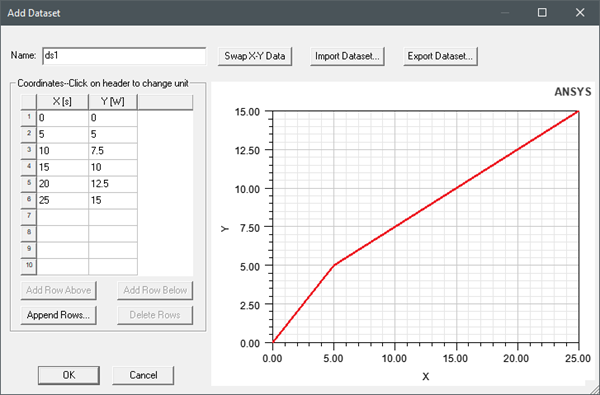
Some parameters for Icepak thermal boundary conditions and design settings can be assigned a transient value using a dataset. For a complete list of transient parameters, see Transient Thermal Properties Dependency. You can access the Add Dataset dialog two ways:
- Create a dataset prior to defining thermal boundary conditions or design settings by adding a design dataset. See Adding Datasets for more information.
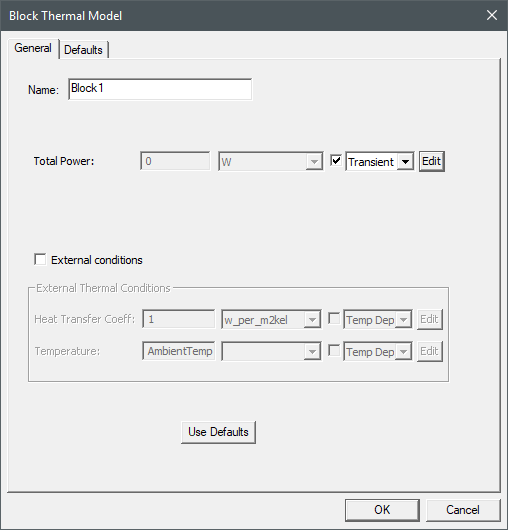
- When defining thermal boundary conditions or design settings, enable the transient option for the parameter and define the dataset. See Defining a Dataset for Transient Parameters for more information.
Note: Network node power must be assigned using the piecewise linear function. You can optionally use this method for other parameters that can be defined as transient. For more information, see Defining Transient Network Node Power.
Note: Datasets you have previously created are available as options in the Variation drop-down list.

Defining a Dataset for Transient Parameters
- In the boundary condition or design settings dialog box, enable the check box next to the parameter.
- Select Transient from the drop-down list and click Edit.
- In the Advanced Time Variations dialog box, select Piecewise Linear from the Time Variation Function drop-down list.
- Specify a value for S0, which is the multiplier value applied to the variable parameter defined in the piecewise linear dataset (y-axis value).
- From the Variation drop-down list. select Edit.
- In the Datasets dialog box, click Add > 1D Dataset.
- In the Add Dataset dialog box, enter a Name.
- In the Coordinates area, click the X column header and select Time and then click it again and select a unit of time.
- Click the Y column header and select a parameter category (e.g., Power) and then click it again and select a unit for the parameters (e.g., W).
- In the X and Y columns enter the values for time and the time-dependent parameter.
- Click OK to save the dataset.
- In the Datasets dialog box, click Done.