
Assigning Network Properties
A network is a two-dimensional modeling boundary condition that can be used to approximate complex thermal components or systems. They consist of nodes linked together using either resistor (R) or convective (C) connections. The network schematic editor allows you to make fairly complicated (and arbitrarily connected) thermal networks to model various components, like an IC package, a heat pipe, a cold plate, or a desktop server. Each network can consist of a set of external nodes (faces) that are connected to internal network nodes, which, in turn, can be connected to other internal nodes or boundary nodes. External face nodes can be connected to each other as well.
In face-selection mode, you can select one or more faces and create a network boundary condition using the schematic in the Network Thermal Model dialog box. Based on the number of faces you select, the schematic is initially populated with nodes and links.
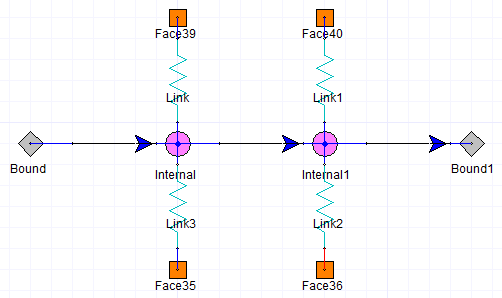
Network Nodes and Links
Networks consist of a set of external nodes, boundary nodes, and internal nodes. External nodes represent the geometry of the network face, so that you can visualize the geometric shape to which the internal nodes are connected. Boundary nodes represent boundary conditions for the network node. They are just like regular boundary conditions that you would apply at a wall (for example, fixed heat flux or fixed temperature). Internal nodes represent objects that you want to lump together to have a single temperature. For example, if you are modeling an IC package or a chip, the junction would be an internal node. The assumptions here are that the internal details of the chip are not important and that the most important characteristic that would be of interest in modeling is the junction node. The rest of the chip is modeled through resistance connections to surfaces.
External nodes and internal nodes can be connected by resistive links (R links) or convective links (C links). R links can represent complicated thermal networks that the network block object alone cannot model. For instance, if you want to model a package with multiple heat sources and represent it with a network thermal boundary condition, you can create the package by assigning a network boundary condition to a hollow block. The internal nodes represent the various junctions (heat sources), and their connections to the external nodes (that are positioned on the faces of the hollow block) or to other internal nodes represent the thermal heat flow paths in the package. C links allow you to specify mass flow and the direction of the flow.
The mass flow rate entering and leaving any internal node must sum to zero to account for conservation. Face nodes/surfaces must be located on domain boundaries (for example, a cabinet boundary or surfaces of objects with Solve Inside turned off) since they represent a connection to an external domain that you do not want to model in detail.