
The GDSII file format does not directly support the concept of nets. When ECAD Xplorer imports a GDSII file, it creates nets based on the placement of geometries, cells, cell references, and text, and input on the GDSII file’s control file, specifically the BLACK_BOX_CELLS rules in the GDS_CELL_RULES section and all GDS_NET_DEFINITIONS rules. The Net Tracing tool builds the nets starting at text specified in the GDS_NET_DEFINITIONS rules.
Compare to Net Tracing in IC Mode.
When activated, the Net Tracing window identifies the primitive that encapsulates the text’s location. It traces (searches for) any primitives that are physically connected to the encapsulating primitive and adds them to the net. The tool next traces primitives that are physically connected to the ones it just added, until all possible physically connected primitives are identified and added to the net.
Only text that is identified in the control file can become the seed for a net. New starting point text cannot be added in ECAD Xplorer.
To predict where a net are created, highlight a primitive that encloses the net's text and click Show Physically Connected. All primitives that are physically connected to the selected primitive are highlighted.
To create the nets:
- From the Layout tab, click Net Tracing. The Net Tracing window opens with a list of all potential nets, each with this information:
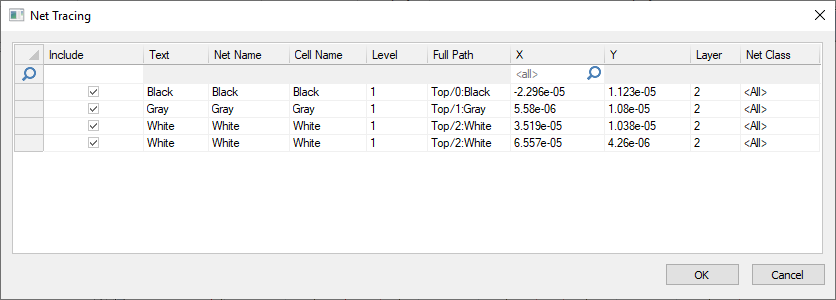
- Include: whether or not net tracing are performed on this text object
- Text: the origin text for the net
- Net Name: the name that are applied to the net if/when it is created
- Cell Name: the name of the cell the text is in
- Level: the level the net is at in the design hierarchy
- Full path: The net’s location in the design hierarchy
- X: The x coordinate of the starting text
- Y: The y coordinate of the starting text
- Layer: The layer the starting text is on
- Net Class: The name of a group of associated nets
- Click OK to close the window. The included nets are created and their starting text is deleted on the cell. Any remaining text can be used again.