
These options control the colors and mode for selected objects.
Changes to global options only affect new layout designs (i.e., navigating to Tools > Options > General Options to open the global Options window, and choosing from the options in the Layout Editor tab). To configure options for the active design, navigate to the Design Options window (i.e., from Layout, select Settings). Then choose options on the associated tabs, and click OK to save changes.
Complete these steps to reach the Layout Editor Selection options.
-
Navigate either of the following paths:
-
To change new layout designs, navigate to Tools > Options > General Options > Layout Editor.
-
To change an active design's settings, navigate toLayout > Settings.
-
From the Layout Editor tree, click Selection.
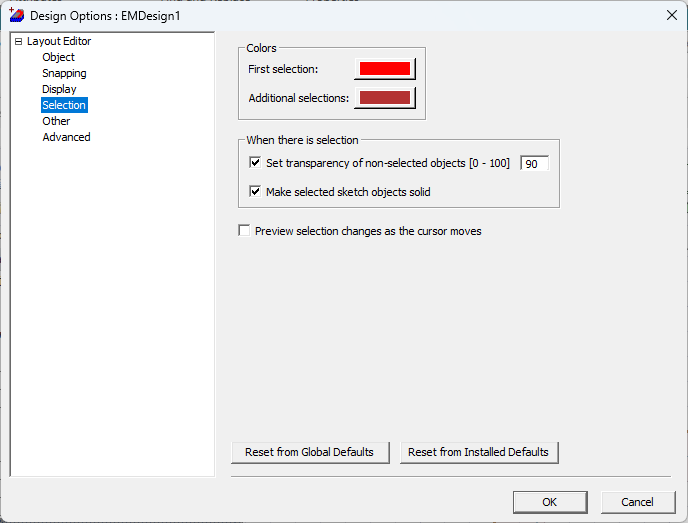
- Colors – by default, the first object selected (i.e., First Selection) is colored bright red, and Additional Selections turn dark red. Click the adjacent palette icons to select new colors.
- When there is selection area – specified objects can be set to transparent or solid to highlight them. Check both/either of the following boxes, as appropriate:
- Set transparency of non-selected objects – automatically differentiates between the selected object and non-selected objects by making non-selected objects transparent. Enter a transparency percentage in the adjacent field (default is 90).
- Make selected sketch objects solid – makes selected objects solid, while non-selected objects remain outline only.
- Preview Selection Changes as the Cursor Moves — changes the color of an object to the First Selection color as the cursor moves across it.