
When you export to Gerber from a layout in the Ansys Electronics Desktop (AEDT)TM electronics systems design platform, each layer is treated as a separate “page” and each page is exported to a separate file. Each file is named by appending the layer/page number to the export file name that is selected by the user.
- You can export more than one layer/page to a Gerber file by selecting additional layers in the Gerber Export window. Header information in each exported file lists the layers that are included in the file.
- You can suppress the exporting of a particular Gerber layer by deleting the page(s) in the Gerber Export window. Only those pages that are displayed in the Gerber Export window are exported.
To export layout data, on the File menu, select Export > Gerber to open an explorer window. Name and save the .Gerber file. Then, select Gerber to open the Gerber Export window.
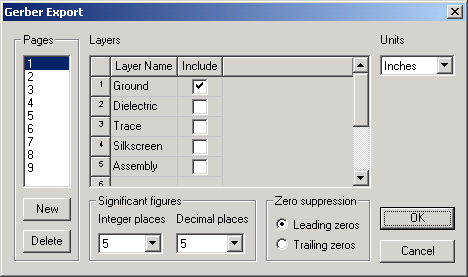
- Click New to add pages or Click Delete to remove pages.
- Check an Include area for each Layer you wish to save.
- Set Units to Inches or Millimeters.
- Select the chosen Zero suppression setting.
- Select the chosen number of Significant figures for Integer and Decimal places.
- Click OK.
Text that is Hershey font are exported as polygons. That is, the text is thickened. AEDT exports Gerber RS274-X format.