
To access the Geometry Healing window, do either of the following:
-
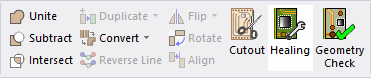
Navigate to the Layout ribbon and click Healing.
-
Right-click in the Layout Editor and select Draw > Geometry Healing.

The Geometry Healing window opens at the Point Snapping tab.
Point Snapping
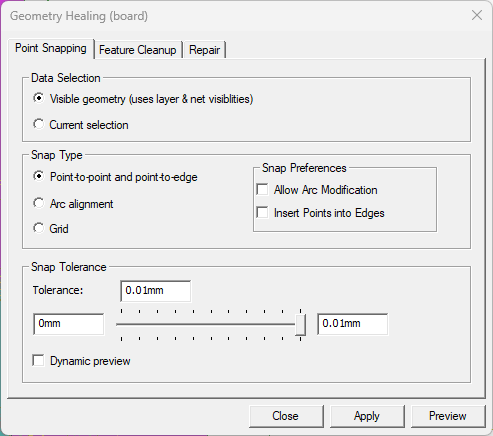
From the Point Snapping tab, do the following:
-
Data Selection – select either of the following options to determine what geometry to heal:
-
Visible geometry (uses layer & net visibilities – analyzes all visible geometry, based on current layer and net visibility settings.
-
Current selection – analyzes only the currently selected geometries.
-
-
Snap Type – select one of the following snap types:
-
Point-to-Point and point-to-edge – attempts to snap points to points and points to edges. Keep in mind:
- only points in the tolerance are moved.
- points are snapped across nets (i.e., nets are not shorted).
- a snap is rejected if the angle around the point changes by more than 1 degree.
- locked objects can be snap targets but are not themselves altered.
- points may snap to the edge of a trace but traces themselves are not moved.
- vias act as snap targets but are not changed.
- rectangles may become polygons.
-
Arc Alignment – aligns arcs that share a similar center or a similar radius. Keep in mind:
- only arcs with centers or radii in the tolerance are adjusted.
- healing aligns the start/end points of traces and bondwires with circles and vias.
- vias are treated as fixed objects (i.e., they do not move, but other arcs may align to them).
- healing attempts to align arcs but does not guarantee alignment, especially when multiple arcs are connected in a polygon.
-
Grid – snaps all geometry points to a grid defined by the user-specified tolerance. All points (i.e., coordinates) are rounded to the tolerance value supplied. Keep in mind:
- healing snaps all primitives.
- healing snaps the center location of vias.
- healing snaps the start/end locations of bondwires.
-
-
Snap Preferences – check either/both of the following options, as appropriate:
-
Allow Arc Modification – arcs drawn in close proximity to another primitive's edge will snap to the primitive if they are both healed.

-
Insert Points into Edges – if adjacent primitives with edges in close proximity are both healed, new points will appear at midpoints between their existing edges and at the new edges created where they snap together.

-
-
Snap Tolerance – Enter a value in the first field to set a minimum area, or move the slider to an appropriate value. All points at a distance less than the specified distance are snapped. Check Dynamic preview to see a live update as the threshold is adjusted.
Feature Cleanup
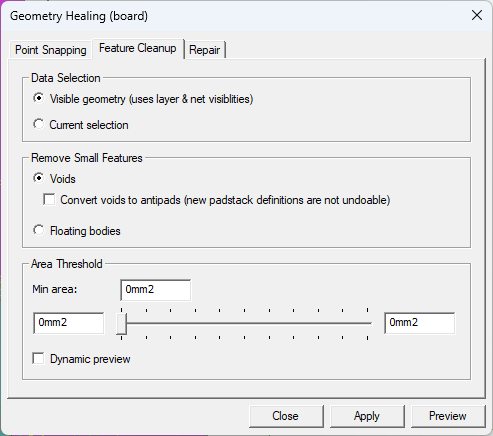
From the Feature Cleanup tab, do the following:
-
Data Selection – select either of the following options to determine what geometry to heal:
-
Visible geometry (uses layer & net visibilities – analyzes all visible geometry, based on current layer and net visibility settings.
-
Current selection – analyzes only the currently selected geometries.
Note:For Voids and Floating bodies cleanup, all the geometry is inspected to determine if the criteria for cleanup is met.
-
-
Remove Small Features – select one of the following small feature types to remove:
-
Voids – removes voids with an area less than the user-specified Area Threshold. Keep in mind:
- healing does not remove voids with vias passing through them.
- If appropriate, check Convert voids to antipads (new padstack definitions are not undoable). Voids can only be converted if they meet the following criteria:
- Voids can only be converted if they are circular or rectangular and the via passes through their centers.
- The vias must be in a different net from the void owner (e.g., the via is in a TX net and the void owner is in GND).Note:
This creates new padstack definitions, which are not removed by Undo.
If these conditions are met, the explicit void is replaced with an implicit void generated using an antipad.
- If appropriate, check Convert voids to antipads (new padstack definitions are not undoable). Voids can only be converted if they meet the following criteria:
- healing does not remove voids with vias passing through them.
-
Floating Bodies – removes small islands of metal with an area less than the user-specified Area Threshold. Keep in mind:
- if floating bodies are attached to other bodies, the total connected area is considered (takes into account vias).
- during analysis, all geometry (selected and visible) is included.
- healing does not remove bodies with ports attached.
-
-
Area Threshold – enter a value in the first field to set a minimum area, or move the slider to an appropriate value. All features smaller than the specified area are removed. Check Dynamic preview to see a live update as the threshold is adjusted.
Repair
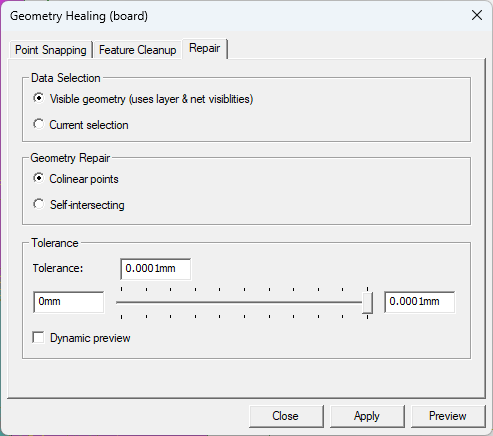
From the Repair tab, do the following:
-
Data Selection – select either of the following options to determine what geometry to heal:
-
Visible geometry (uses layer & net visibilities – analyzes all visible geometry, based on current layer and net visibility settings.
-
Current selection – analyzes only the currently selected geometries.
-
-
Geometry Repair – select either of the following geometry repair operations:
-
Colinear points – removes collinear points from polygons and trace center-lines. Keep in mind:
- points are considered collinear if they deviate from the chord connecting the adjacent points by less than the user-specified Tolerance.
- the analysis also removes very narrow intrusions and spikes from a polygon.
-
Self-intersecting – removes self-intersections from polygon data. Keep in mind:
- the negative region of the self-intersection is excised.
- voids are correctly preserved – this may require duplicating a void if it overlaps two positive lobes of a self-intersecting shape.
-
-
Tolerance – Enter a value in the first field to set a minimum area, or move the slider to an appropriate value. All points at a distance less than the specified distance are snapped. Check Dynamic preview to see a live update as the threshold is adjusted.
Once selections are made, select from the following:
Preview – shows a preview of the operation without changing the database. Various statistics appear after a preview or application. The worst case estimate is typically shown – click magnifying glass to jump to that location.
Apply – save changes.
Close.