
To export layout data, on the File menu, select Export > AutoCAD to open an explorer window. Selecting AutoCad DXF File opens the DXF Export window.
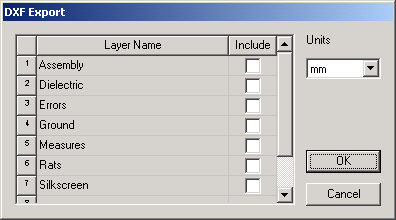
- Choose a unit of measurement on the Units drop-down menu (cm, ft, in, km, meter, mil, nm, uin, um). Default type is mm.
- Check an Include area for each Layer Name you wish to save and click OK.
During export, a polygon with voids is converted into a single polygon with no holes where bridges connect the voids to the outer contour.
Text that is Hershey font are exported as polygons, that is, the text is thickened.