
Running a Script
Electronics Desktop scripts can be run from within the software or from the command line.
Within Electronics Desktop
To run scripts in Electronics Desktop:
- Click Tools > Run Script, or select the Automation tab and click the Run Script icon:
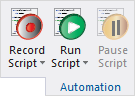
The Run Script file browser appears.
- Use the file browser to locate the script file (*.vbs, *.py, or *.js).
- If desired, type script arguments in the Script Arguments field:
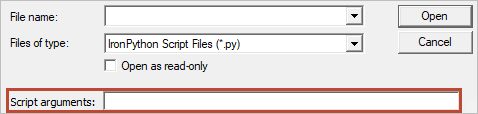
You can access script arguments using the AnsoftScriptHost.arguments collection from VBScript. This is a standard COM collection.
- Click Open.
Electronics Desktop executes the script.
While script execution is in progress, the Run Script button transforms into a Stop Script button. Click Stop Script to stop the script execution.
To temporarily pause a running script, click Pause Script. This button transforms into a Resume Script button, which you can click to resume script execution.
From the Command Line
To run a script from a command line, add the -runscriptandexit or -runscript argument to the Electronics Desktop command line syntax.
To use script arguments, add the -scriptargs parameter and specify the arguments. For example:
ansysedt.exe -scriptargs "hello there"
In Iron Python, the command line parameter following -scriptargs is passed without modification as a single string in the ScriptArgument python variable.
In VBscript, the command line parameter following -scriptargs is split into multiple strings and converted to a VBscript collection which is accessible via the AnsoftScript.Arguments collection. To access these arguments, for example:
msgbox AnsoftScript.Arguments(0) // Returns 'hello'
msgbox AnsoftScript.Arguments(1) // Returns 'there'
For more information about running a script from the command line, consult the HFSS help topic
Direct Launch
If you run a script directly from the command line without launching Electronics Desktop, script arguments will
be in the WSH.arguments collection instead of the AnsoftScriptHost.arguments
collection. The following script ensures the arguments are accessed regardless of the collection in which they reside:
on error resume next
dim args
Set args = AnsoftScript.arguments
if(IsEmpty(args)) then
Set args = WSH.arguments
End if
on error goto 0
// At this point, args has the arguments regardless of collection
msgbox "Count is " & args.Count
for i = 0 to args.Count - 1
msgbox args(i)
next