
HFSS Waveguide Array Python Script
This sample Python script creates an HFSS Waveguide array. The script includes comment lines, which are preceded by an apostrophe ( ’ ), that offer explanations for each subsequent line or lines. The script includes examples of creating a 3D model, boundaries and excitation, solution setup and sweep, as well as reports.
You must insert an HFSS project before running the script. Running the script causes a series of input dialogs to appear that lets you set parameters.
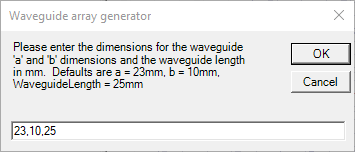
The first dialog asks for input for a and be dimensions and the waveguide length.
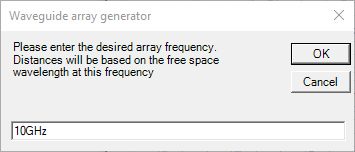
The next asks for the array frequency.
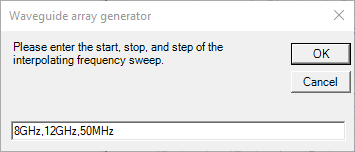
The next asks for start, stop and step values for in an interpolating frequency sweep.
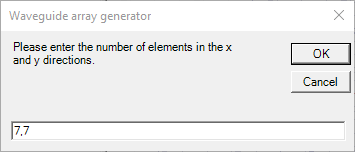
The last one asks for the array definition.
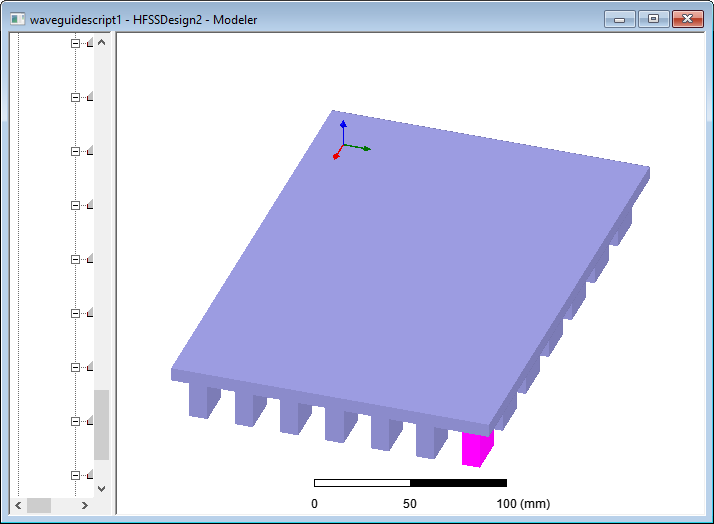
The following figure shows the waveguide array generated by the defaults.
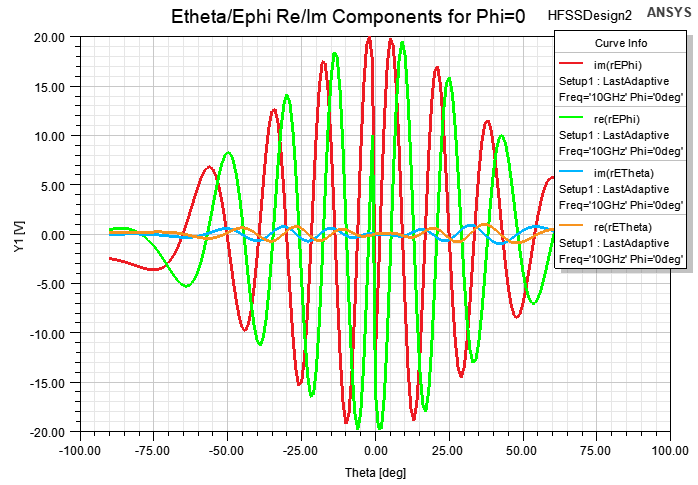
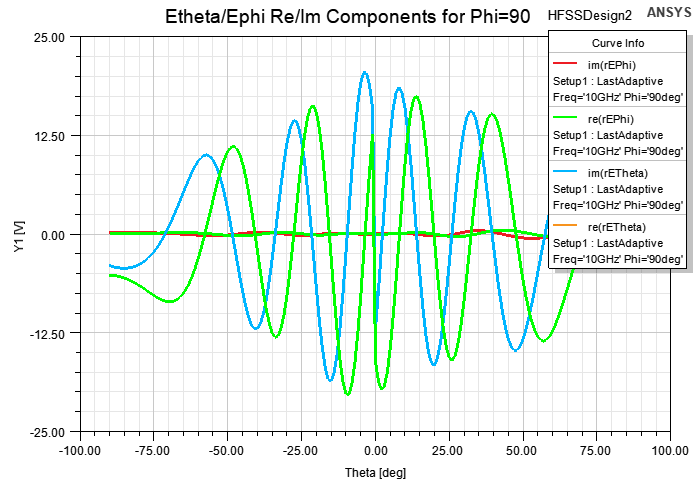
After running the simulation, the plots defined by the script shows the following results.
The waveguide script in Python follows.
import clr
clr.AddReferenceByPartialName("Microsoft.VisualBasic")
from Microsoft.VisualBasic.Constants import vbOKOnly,vbOKCancel,vbAbortRetryIgnore,vbYesNoCancel,vbYesNo,vbRetryCancel
from Microsoft.VisualBasic.Constants import vbOK,vbCancel,vbAbort,vbRetry,vbIgnore,vbYes,vbNo
from Microsoft.VisualBasic.Interaction import InputBox, MsgBox
oProject = oDesktop.GetActiveProject()
oDesign = oProject.GetActiveDesign()
oEditor = oDesign.SetActiveEditor("3D Modeler")
# Ask for dimensions for waveguide dimensions
# -------------------------------------------------------------
dim = InputBox("Please enter the dimensions for the waveguide 'a' and 'b' dimensions "
+ "and the waveguide length in mm. Defaults are a = 23mm, b = 10mm, WaveguideLength = 25mm",
"Waveguide array generator", "23,10,25")
Dimensions = dim.split(',')
a_str = Dimensions[0] + "mm"
b_str = Dimensions[1] + "mm"
b_over2 = float(Dimensions[1])/2
WaveguideLength_str = Dimensions[2] + "mm"
#Ask for the frequency of operation
#----------------------------------
Frequency = InputBox("Please enter the desired array frequency. Distances will " +
"be based on the free space wavelength at this frequency",
"Waveguide array generator", "10GHz")
#Ask for the start, stop, and step of the interpolating frequency sweep
#----------------------------------------------------------------------
inputText = InputBox("Please enter the start, stop, and step of the interpolating " +
"frequency sweep.", "Waveguide array generator", "8GHz,12GHz,50MHz")
StartFrequency, StopFrequency, StepFrequency = inputText.split(',')
#Ask for the number of elements in the x and y directions
#--------------------------------------------------------
inputText = InputBox("Please enter the number of elements in the x and y directions.",
"Waveguide array generator", "7,7")
numX, numY = [float(elem) for elem in inputText.split(',')]
TotalElements = numX*numY
# Make variables and set them equal to the values from the user input
# -------------------------------------------------------------------
oDesign.ChangeProperty(
[
"NAME:AllTabs",
[
"NAME:LocalVariableTab",
[
"NAME:PropServers",
"LocalVariables"
],
[
"NAME:NewProps",
[
"NAME:a", "PropType:=", "VariableProp", "UserDef:=", True,
"Value:=", a_str
],
[
"NAME:b", "PropType:=", "VariableProp", "UserDef:=", True,
"Value:=", b_str
],
[
"NAME:NumX", "PropType:=", "VariableProp", "UserDef:=", True,
"Value:=", numX
],
[
"NAME:NumY", "PropType:=", "VariableProp", "UserDef:=", True,
"Value:=", numY
],
[
"NAME:WaveguideLength", "PropType:=", "VariableProp", "UserDef:=", True,
"Value:=", WaveguideLength_str
],
[
"NAME:Frequency", "PropType:=", "VariableProp", "UserDef:=", True,
"Value:=", Frequency
],
[
"NAME:Lambda", "PropType:=", "VariableProp", "UserDef:=", True,
"Value:=", "c0/" + Frequency
],
[
"NAME:RadBoundDist", "PropType:=", "VariableProp", "UserDef:=", True,
"Value:=", "Lambda/4"
]
]
]
])
#Create the radiation box
#------------------------
oEditor.CreateBox(
[
"NAME:BoxParameters",
"XPosition:=" , "-a/2-RadBoundDist",
"YPosition:=" , "-b/2-RadBoundDist",
"ZPosition:=" , "0mm",
"XSize:=" , "NumX*a+(NumX-1)*Lambda/2+2*RadBoundDist",
"YSize:=" , "NumY*b+(NumY-1)*Lambda/2+2*RadBoundDist",
"ZSize:=" , "RadBoundDist"
],
[
"NAME:Attributes",
"Name:=" , "RadiationBox",
"Flags:=" , "",
"Color:=" , "(132 132 193)",
"Transparency:=" , 0.8,
"PartCoordinateSystem:=", "Global",
"UDMId:=" , "",
"MaterialValue:=" , "\"vacuum\"",
"SurfaceMaterialValue:=", "\"\"",
"SolveInside:=" , True,
"IsMaterialEditable:=" , True,
"UseMaterialAppearance:=", False,
"IsLightweight:=" , False
])
oEditor.FitAll() # Zoom out
#Create first element
#--------------------
oEditor.CreateBox(
[
"NAME:BoxParameters",
"XPosition:=" , "-a/2",
"YPosition:=" , "-b/2",
"ZPosition:=" , "0mm",
"XSize:=" , "a",
"YSize:=" , "b",
"ZSize:=" , "-WaveguideLength"
],
[
"NAME:Attributes",
"Name:=" , "Element1",
"Flags:=" , "",
"Color:=" , "(132 132 193)",
"Transparency:=" , 0.8,
"PartCoordinateSystem:=", "Global",
"UDMId:=" , "",
"MaterialValue:=" , "\"vacuum\"",
"SurfaceMaterialValue:=", "\"\"",
"SolveInside:=" , True,
"IsMaterialEditable:=" , True,
"UseMaterialAppearance:=", False,
"IsLightweight:=" , False
])
# Define the port
# ---------------
# Get the numeric value of half of the b dimension of the port.
# The values fed in to the "Start" and "End" arrays cannot have mathematical operators. For example, if HFSS
# has a variable 'b', and a desired coordinate is 'b/2', that value cannot be entered here as "b/2". The number
# has to be computed explicitly in script and entered as a string such as "-200mm".
oModule = oDesign.GetModule("BoundarySetup")
# get bottom face ID
element1FaceID = oEditor.GetFaceByPosition(
[
"NAME:Parameters",
"BodyName:=", "Element1",
"XPosition:=", "-a/2",
"YPosition:=", "-b/2",
"ZPosition:=", "-WaveguideLength"
])
oModule.AssignWavePort(
[
"NAME:WavePort1",
"Faces:=" , [element1FaceID],
"NumModes:=" , 1,
"RenormalizeAllTerminals:=", True,
"UseLineModeAlignment:=", False,
"DoDeembed:=" , False,
[
"NAME:Modes",
[
"NAME:Mode1",
"ModeNum:=" , 1,
"UseIntLine:=" , True,
[
"NAME:IntLine",
"Start:=" , ["0mm", "-" +str(b_over2) + "mm", "-" + WaveguideLength_str],
"End:=" , ["0mm", str(b_over2) + "mm", "-" + WaveguideLength_str]
],
"AlignmentGroup:=" , 0,
"CharImp:=" , "Zpi"
]
],
"ShowReporterFilter:=" , False,
"ReporterFilter:=" , [True],
"UseAnalyticAlignment:=", False
])
#Set the radiation boundary
#--------------------------
# Get face IDs for further assignment
top_face_id = oEditor.GetFaceByPosition(["NAME:FaceParameters",
"BodyName:=", "RadiationBox",
"XPosition:=", "0mm",
"YPosition:=", "NumY*b-b/2+(NumY-1)*Lambda/2+RadBoundDist",
"ZPosition:=", "0mm"])
faceIDs = [int(elem) for elem in oEditor.GetFaceIDs("RadiationBox") if elem != str(top_face_id)]
oModule.AssignRadiation(
[
"NAME:Radiation",
"Faces:=" , faceIDs,
"IsFssReference:=" , False,
"IsForPML:=" , False
])
# Copy and paste elements/ports into a rectangular array.
# Duplicate boundaries with geometry" must be turned on under Tools->Options->HFSS Options
# -----------------------------------------------------------------------------------------
ElementNum = 1
for i in range(1, int(numX)+1):
for j in range(1, int(numY)+1):
if ElementNum == 1:
pass
elif ElementNum <= numY: #If in the first column, only
oEditor.Copy(["NAME:Selections", "Selections:=", "Element1"])
oEditor.Paste()
oEditor.Move(["NAME:Selections", "Selections:=", "Element" + str(ElementNum)],
["NAME:TranslateParameters", "CoordinateSystemID:=", -1,
"TranslateVectorX:=", "0mm",
"TranslateVectorY:=", str(j-1) + "*(b+Lambda/2)",
"TranslateVectorZ:=", "0mm"])
elif ElementNum > numY:
oEditor.Copy(["NAME:Selections", "Selections:=", "Element1"])
oEditor.Paste()
oEditor.Move(["NAME:Selections", "Selections:=", "Element" + str(ElementNum)],
["NAME:TranslateParameters", "CoordinateSystemID:=", -1,
"TranslateVectorX:=", str(i-1) + "*(a+Lambda/2)",
"TranslateVectorY:=", str(j-1) + "*(b+Lambda/2)",
"TranslateVectorZ:=", "0mm"])
ElementNum += 1
#Create the setup and interpolating sweep
#----------------------------------------
oModule = oDesign.GetModule("AnalysisSetup")
oModule.InsertSetup("HfssDriven",
[
"NAME:Setup1",
"AdaptMultipleFreqs:=" , False,
"Frequency:=" , Frequency,
"MaxDeltaS:=" , 0.02,
"PortsOnly:=" , False,
"UseMatrixConv:=" , False,
"MaximumPasses:=" , 15,
"MinimumPasses:=" , 1,
"MinimumConvergedPasses:=", 1,
"PercentRefinement:=" , 50,
"IsEnabled:=" , True,
"BasisOrder:=" , 1,
"DoLambdaRefine:=" , True,
"DoMaterialLambda:=" , True,
"SetLambdaTarget:=" , False,
"Target:=" , 0.3333,
"UseMaxTetIncrease:=" , False,
"PortAccuracy:=" , 2,
"UseABCOnPort:=" , False,
"SetPortMinMaxTri:=" , False,
"UseDomains:=" , False,
"UseIterativeSolver:=" , False,
"SaveRadFieldsOnly:=" , False,
"SaveAnyFields:=" , True,
"IESolverType:=" , "Auto",
"LambdaTargetForIESolver:=", 0.15,
"UseDefaultLambdaTgtForIESolver:=", True
])
oModule.InsertFrequencySweep("Setup1",
[
"NAME:InterpolatingSweep",
"IsEnabled:=" , True,
"RangeType:=" , "LinearStep",
"RangeStart:=" , StartFrequency,
"RangeEnd:=" , StopFrequency,
"RangeStep:=" , StepFrequency,
"Type:=" , "Interpolating",
"SaveFields:=" , False,
"InterpTolerance:=" , 0.5,
"InterpMaxSolns:=" , 50,
"InterpMinSolns:=" , 0,
"InterpMinSubranges:=" , 1,
"ExtrapToDC:=" , False,
"InterpUseS:=" , True,
"InterpUsePortImped:=" , False,
"InterpUsePropConst:=" , True,
"UseDerivativeConvergence:=", False,
"InterpDerivTolerance:=", 0.2,
"UseFullBasis:=" , True,
"EnforcePassivity:=" , True,
"PassivityErrorTolerance:=", 0.0001
])
#Create a relative coordinate system centered on the array for radiation pattern calculations
#--------------------------------------------------------------------------------------------
oEditor.CreateRelativeCS(
[
"NAME:RelativeCSParameters",
"Mode:=" , "Axis/Position",
"OriginX:=" , "-a/2+NumX*a/2+(NumX-1)*Lambda/4",
"OriginY:=" , "-b/2+NumY*b/2+(NumY-1)*Lambda/4",
"OriginZ:=" , "0mm",
"XAxisXvec:=" , "1mm",
"XAxisYvec:=" , "0mm",
"XAxisZvec:=" , "0mm",
"YAxisXvec:=" , "0mm",
"YAxisYvec:=" , "1mm",
"YAxisZvec:=" , "0mm"
],
[
"NAME:Attributes",
"Name:=" , "RelativeCS1"
])
#Create an infinite sphere with fine theta resolution and phi cuts at 0 and 90 degrees
#-------------------------------------------------------------------------------------
oModule = oDesign.GetModule("RadField")
oModule.InsertFarFieldSphereSetup(
[
"NAME:Infinite Sphere1",
"UseCustomRadiationSurface:=", False,
"ThetaStart:=" , "-90deg",
"ThetaStop:=" , "90deg",
"ThetaStep:=" , "1deg",
"PhiStart:=" , "0deg",
"PhiStop:=" , "90deg",
"PhiStep:=" , "90deg",
"UseLocalCS:=" , True,
"CoordSystem:=" , "RelativeCS1"
])
#Create output plots for Ephi/Etheta real and imaginary components for Phi = 0 and separately for Phi = 90
#---------------------------------------------------------------------------------------------------------
oModule = oDesign.GetModule("ReportSetup")
#For phi = 0
oModule.CreateReport("Etheta/Ephi Re/Im Components for Phi=0", "Far Fields",
"Rectangular Plot", "Setup1 : LastAdaptive",
[
"Context:=" , "Infinite Sphere1"
],
[
"Theta:=" , ["All"],
"Phi:=" , ["0deg"],
"Freq:=" , ["All"],
"a:=" , ["Nominal"],
"b:=" , ["Nominal"],
"NumX:=" , ["Nominal"],
"NumY:=" , ["Nominal"],
"WaveguideLength:=" , ["Nominal"],
"Frequency:=" , ["Nominal"]
],
[
"X Component:=" , "Theta",
"Y Component:=" , ["im(rEPhi)","re(rEPhi)","im(rETheta)","re(rETheta)"]
], [])
#For phi = 90
#------------
oModule.CreateReport("Etheta/Ephi Re/Im Components for Phi=90", "Far Fields",
"Rectangular Plot", "Setup1 : LastAdaptive",
[
"Context:=" , "Infinite Sphere1"
],
[
"Theta:=" , ["All"],
"Phi:=" , ["90deg"],
"Freq:=" , ["All"],
"a:=" , ["Nominal"],
"b:=" , ["Nominal"],
"NumX:=" , ["Nominal"],
"NumY:=" , ["Nominal"],
"WaveguideLength:=" , ["Nominal"],
"Frequency:=" , ["Nominal"]
],
[
"X Component:=" , "Theta",
"Y Component:=" , ["im(rEPhi)","re(rEPhi)","im(rETheta)","re(rETheta)"]
], [])