
Edit Sources Panel for CMA
For characteristic mode analysis, the Edit Sources panel allows you to specify the modal weight for each characteristic mode used to form the total field displayed. In addition, for designs where ports are defined, you can specify the excitation values of the ports. In the case of port excitations, a linear combination of the solved characteristic modes will be determined, which matches the specified port values. The default value of Mode count in the Edit Sources panel is 10. The CMA data panel in the Solution Data dialog displays the actual modes above the minimum modal significance for any specific solution.
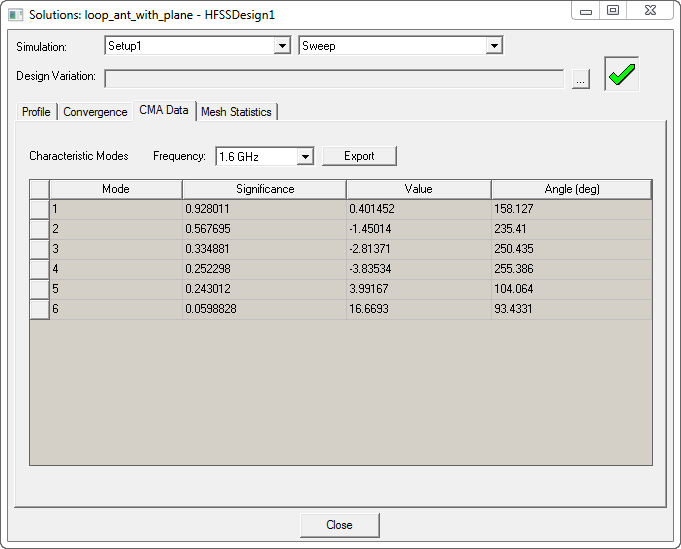
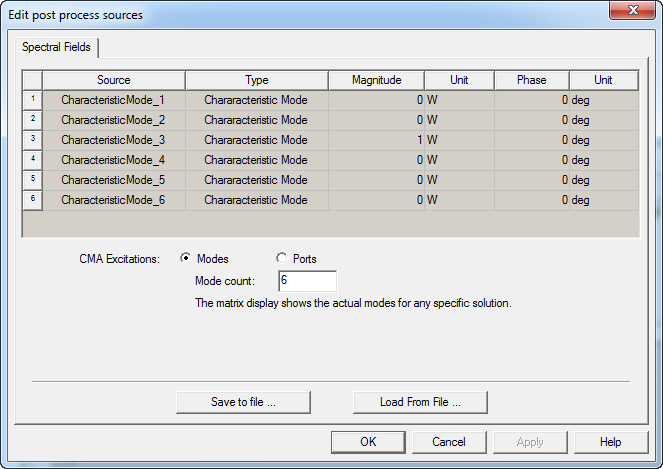
Enter this value in the Mode count field. For example, if the matrix display shows 6 modes above the specified value of minimum modal significance, enter 6 in the Mode count field. Excite the magnitude and/or phase of the mode whose current pattern you wish to see in the design. For example, if you want to see surface currents due for Mode 3, define the magnitude or phase for CharacteristicMode_3 and set the other characteristic modes to 0. You can also define the magnitude and/or phase of a combination of characteristic modes.