
Set as Frequency Selective Surface Reference
You can set one reference of a Frequency Selective Surface.
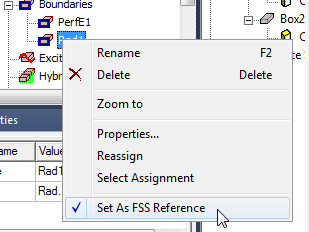
To setup Frequency Selective Surface, users right-click a radiation
boundary and click the menu Set As FSS Reference.
A check indicates that the boundary is selected as reference. This menu
is always enabled. Inappropriate setups are handled by design validation
checks.
This surface become the input surface for calculations of the reflection/transmission coefficients. The other radiating surface automatically becomes output. Only one FSS can be defined in a given model. Using the option is advantageous for highly reflective and resonant structures. Reflection/Transmission coefficients for FSS designs can be viewed in the solution data panel as S-parameters or you can create an S-parameter report.
The requirements are:
- At most one reference is permitted
- Can only be set on a single face
- When a radiation boundary is selected as reference, there must be exactly one plane propagating incident wave that is without geometry assignment or assigned to the face of the radiation boundary
- Require at least one primary/secondary (Lattice pair) boundary
- Incompatible with ports (design cannot have ports)