Component Priority
Component Priority provides a way to resolve component intersection conflicts with native objects. It is common for a large project to have some native objects intersect with mesh fusion/mesh assembly, or encrypted 3D components, that is components with a defined mesh region, due to user errors or modeling issues. Such intersections are usually small and would not affect simulation result if ignored, but they can stop simulations and cost much time to fix. To improve this problem, you can mark any of these components as priority. If such intersection appears, the intersecting portion will be subtracted from the native object, so that the components marked as priority stay intact and the simulation could continue.
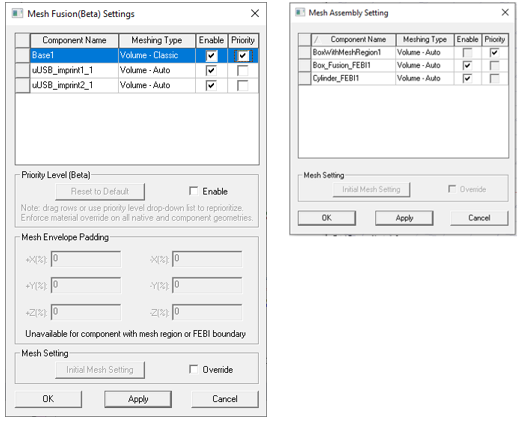
You can mark any component as priority as long as it has defined mesh region. This feature does not support array or SBR+ solution type. You access the feature through either the dialogs for the Set Components for Mesh Assembly... command or the Set Components for Mesh Fusion... commands.
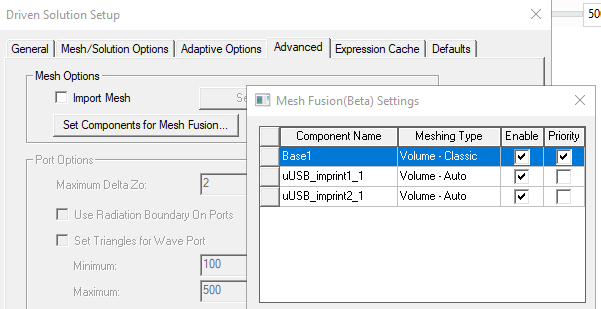
You can also access these dialogs through the Advanced tab of the Solution Setup.
The components for which you can set priority include:
-
Components with mesh region manually assigned. This feature also supports encrypted components because the subtraction will not expose any of their internal data.
-
Components marked as mesh fusion (They will have mesh envelopes automatically generated).
-
Layout components in 3D if they are marked as mesh fusion.
The subtraction only works on normal native objects.
-
If the priority component is intersecting with an object from a component marked with priority as well, or from a component marked as mesh fusion/mesh assembly, or from an encrypted component, then the setup is invalid, and the simulation will report error.
-
If the intersection portion has boundary assignment, the setup is invalid, and the simulation will report error
-
The priority setting only affects intersections. It does not change the behavior if one object is fully contained by another object.
-
This feature does not support array or SBR+ solution type.
The steps to process priority components will be saved to a file in the initial mesh folder and the current mesh folder, together with steps to generate mesh fusion imprints (if any). This file will be used to generate identical mesh in the future.
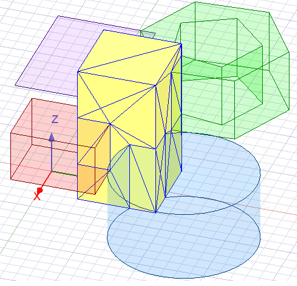
For example, consider a simple design with a component (yellow box) being intersected by many native objects.
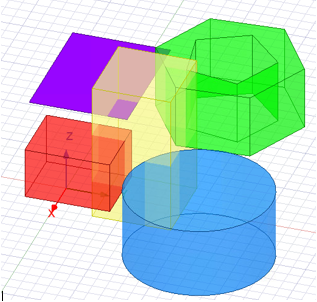
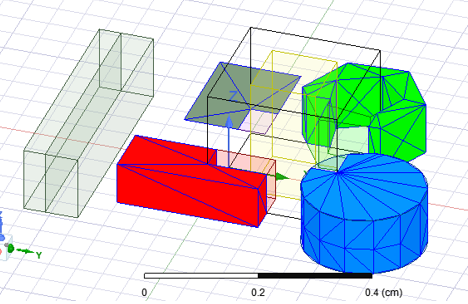
If the priority is not marked for this component, and that component intersects native object, the simulation will report error. If the component is marked as priority. Then the intersecting portion will be subtracted from the native object, and the simulation could complete. Users can plot mesh on the native objects to confirm that the subtraction is applied.
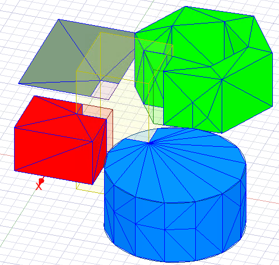
The mesh for the component marked as priority is intact.