
Edit Menu for Schematic Editor
When the Schematic Editor is active in the Design Area, the Edit menu appears similar to the following:
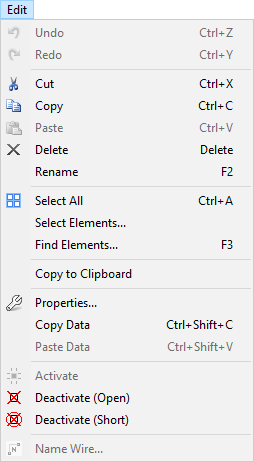
The Schematic Editor Edit menu contains the following options:
- Undo – allows you to undo the last action, which is specified after "Undo."
- Redo – allows you to redo an undone action, which is specified after "Redo."
- Cut / Copy / Paste – allows you to copy and paste schematic elements.
- Delete – deletes a selected element.
- Rename – renames a selected element.
- Select All – selects everything in the design area.
- Select Elements – allows you to select certain nets or components.
- Find Elements – opens the Find Elements window, where you can search for elements by property name and value.
- Copy to Clipboard – copies the visible design area to the clipboard in bitmap format, for pasting into another program or document.
- Properties – displays the relevant properties window for the selected object.
- Copy Data – copies properties data for the selected object.
- Paste Data – pastes properties data into a selected object.
- Activate – causes the activation of one or more selected components.
- Deactivate (Open) – temporarily converts the component into an open circuit.
- Deactivate (Short) – temporarily converts the component into a short circuit.
- Name Wire – allows you to rename a selected wire.