
Edit Menu for Report Window
When the Report Window is the active window, the Edit menu appears similar to the following:
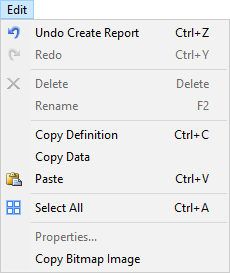
The Report Window Edit menu contains the following options:
- Undo – allows you to undo the last action, which is specified after "Undo."
- Redo – allows you to redo an undone action, which is specified after "Redo."
- Delete – deletes a selected report element.
- Rename – renames a selected report element.
- Copy Definition – copies the report definition.
- Copy Data – copies report data.
- Paste – pastes the copied information at your selected location.
- Select All – selects everything in the report window.
- Properties – opens the relevant Properties window for the selected report element.
- Copy Bitmap Image – copies the entire report window as a bitmap image that can be pasted into another program or document.