Combline Filters
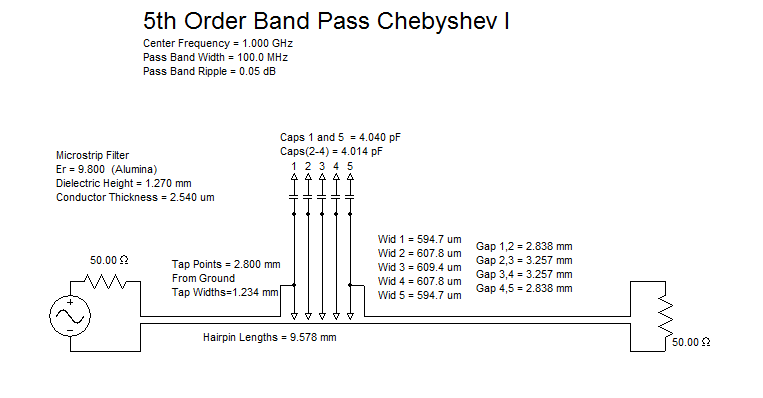
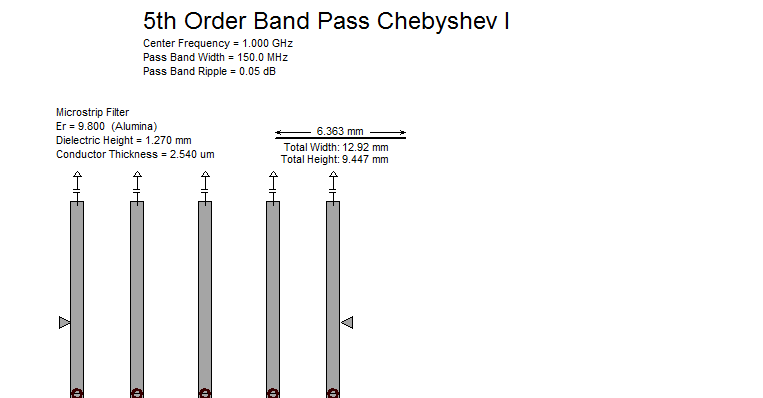
Combline Filter may be produced by selecting a band pass filter with Combline selected in the distributed selection list.
Quarter Length Frequency
Combline filters require a selection of a quarter length frequency. The standard 2 to 1 ratio above the center frequency will not work, and will prompt the user to increase it if it is selected. Ratios of 4 to 8 times higher than the center frequency are preferred.
Taps
Combline filters are frequently unrealizable with realistic geometries, or have excessively small outer gaps. If either of these situations occur, it is desirable to "Tap" the filter. Tapped Combline filters are generally more frequently realizable and have more desirable outer gap geometries when they are realized.
Combline Options
Interdigital line impedance may be user selectable, of the default value is not desired.
Via terminated hairpins are selectable as an option, but are not recommended.
Equal Width Approximation
It is frequently advantageous to maintain the same width for all conductors. When this is the case, selecting the Equal Width Approx option accomplishes this. The resulting increased error is usually negligible.
Manufacturing Geometry Limitations
To meet manufacturing geometry requirements, geometry limits under the Geometry tab are enforced.
Tuning
Combline filters may be tuned by adjusting their tap position, end ring gaps, overall length, and resonator separations. Clicking on the ring resonator schematic or the "Edit" button brings up the Change Control Panel, where values may be easily edited and scrolled to different values while the analysis graphs update in real time. The Change control panel maintains physical symmetry or not as desired.
AEDT Tuning and Optimizing
AEDT tuners and optimizers may tune or optimize the exported filter, and the tuned filter may be imported back into Nuhertz.
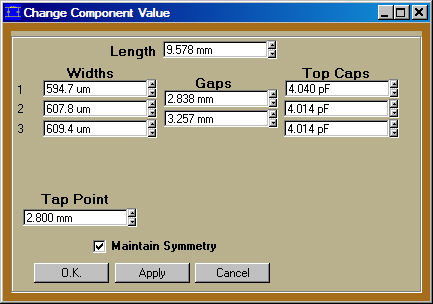
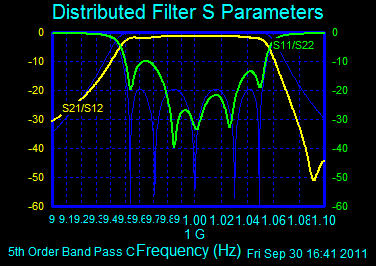
Change Control Panel for Tuning the Combline Filter Geometry.