
MIPI C-PHY Emitter Group
The MIPI C-PHY Emitter Group toolkit automates the workflow for creating emitters based on the MIPI C-PHY specification.
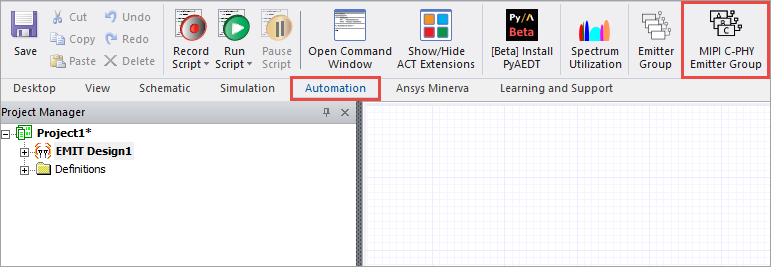
To use the toolkit, navigate to the Automation tab within an EMIT design and select the MIPI C-PHY Emitter Group toolkit.
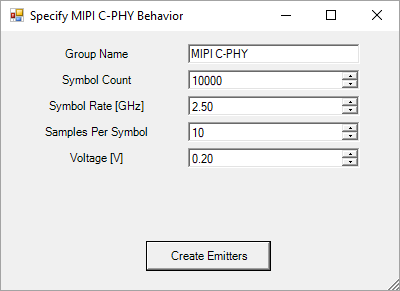
This opens the Specify MIPI C-PHY Behavior window, with some key parameters. These parameters define the spectrum that is generated by the toolkit and used for each emitter:
- Group Name
- Symbol Count
- Symbol Rate [Hz]
- Samples Per Symbol
- Voltage [V]
The window launches with default values to help guide the user.
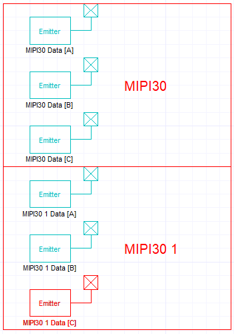
If the Group Name specified matches an existing emitter, the group name will be modified by adding a space and incremental number to the group name, as shown below.
After the MIPI C-PHY emitters are added to the EMIT design, the resulting waveform can be examined by double-clicking on any of the emitters (or by right-clicking and selecting Configure).
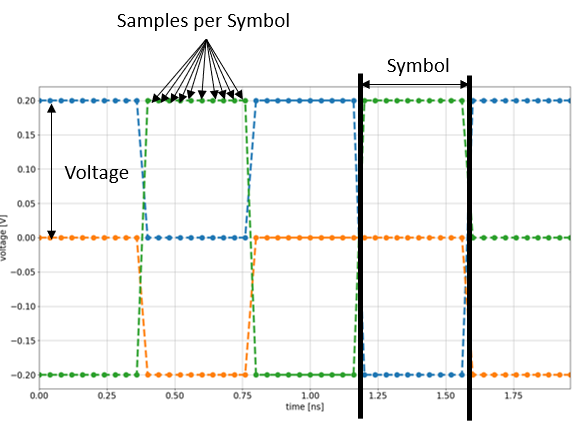
Each created emitter is linked to a text file specifying the time (seconds) and voltage levels (volts) of the signals. The number of data points, N = (Symbol Count) * (Samples per Symbol). During each symbol, the signals remain constant for a number of samples, specified by Samples per Symbol and the duration of each symbol is determined by the Symbol Rate (Hz). The duration in time, T = 1 / (Symbol Rate).
The data generated and stored in these text files implements the MIPI C-PHY signal, conformal to the description in section 4.1 of the MIPI C-PHY, version 2.1. The state transitions between the 6 MIPI C-PHY symbols is enforced by randomly switching to one of the other 5 symbols. The randomness of the generated signal means that running the script with the same variables may not result in the exact same output.