
Importing EMIT Classic Projects and Libraries
The Import from Classic EMIT feature will be deprecated at release 2026 R1. To ensure a smooth transition, please convert all projects to the AEDT format prior to that time.
EMIT Classic projects and libraries can be imported into Ansys Electronics Desktop (AEDT) providing users with new schematic capabilities and tighter integration with other Ansys simulation tools such as HFSS.
To import an EMIT Classic project, do the following:
- Click File > Open, and then change the Files of type field to EMIT Classic Project (*.emit_config) or EMIT Classic Project Archive (*.emitarc).
- Navigate to the desired project file, select it, and click Open. The project is then automatically converted to the AEDT format.
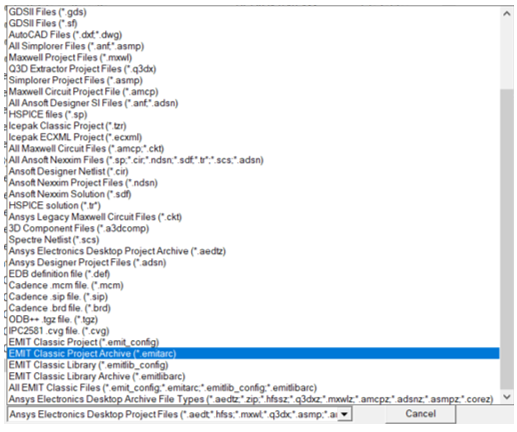
Similarly, EMIT Classic libraries can be imported by:
-
Click File > Open, and then change the Files of type field to EMIT Classic Library (*.emitlib_config) or EMIT Classic Library Archive (*.emitlibarc).
-
Navigate to the desired library file, select it, and click Open. The library components are then automatically converted to the AEDT format and stored in a user's PersonalLib directory.
All project components and settings are transferred during the import with a few minor exceptions that are not currently supported:
- Multiplexers with >5 ports are not currently supported in AEDT.
- S Parameter Components with >3 ports are not currently supported in AEDT.
- RF Systems with multiple configurations - only a single configuration can be imported into each design. Users are prompted during the import to specify which configuration they want for each RF System and can create multiple designs within a single AEDT project.
- Passive Noise and Thermal Noise are automatically set to their default values and cannot be specified in AEDT.
- RF Systems stored in an EMIT Classic library are saved as individual designs in the PersonalLib directory and cannot be viewed from the library tree. To use these designs, users must select File > Open and select the design after navigating to the PersonalLib directory. The designs can be copied and pasted into other designs and/or projects using Ctrl+C and Ctrl+V.