
Coupling Matrix
EMIT's Coupling Matrix window provides a compact way for viewing and manipulating coupling in an EMIT project. The Coupling Matrix presents the complete scene in a matrix format with all antennas/emitters listed both horizontally and vertically. The intersection of two antennas/emitters represents coupling between the antenna/emitter pair.
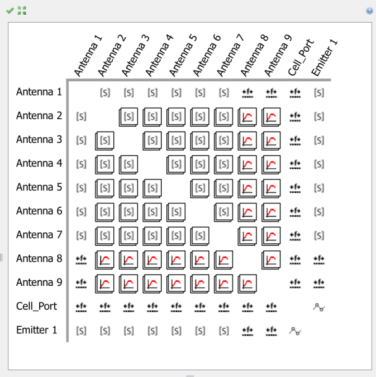
The icons in the matrix represent the type of coupling model that EMIT is using for the analysis of that antenna/emiter pair. If an antenna pair has more than one coupling type associated with it, then the icons will appear "stacked" with the icon for the highest priority coupling model shown. As noted in the Coupling Model section, the priority of the coupling models is determined by the order of the models under the Coupling Data node. The coupling models are shown with the lowest priority model at the top and increasing in priority as you go down the tree. The Coupling Model nodes can all be rearranged via drag-and-drop.
If an antenna/emitter pair has more than one coupling type associated with it, then the icons will appear "stacked" with the icon for the highest priority coupling model shown. As noted in the Coupling Model section, the priority of the coupling models is determined by the order of the models under the Coupling Data node. The coupling models are shown with the lowest priority model at the top and increasing in priority as you go down the tree. The Coupling Model nodes can all be rearranged via drag-and-drop.
Blank entries in the Coupling Matrix matrix represent self-interactions for which coupling is not computed.
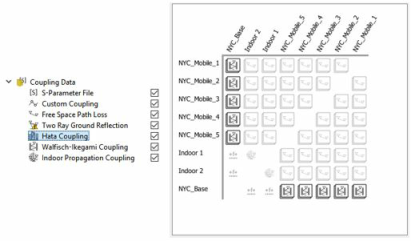
The Coupling Matrix will update based on the selected Coupling Model node. For example, the figure below shows the Antenna Coupling Matrix when the Hata Coupling model is selected in the project tree. The coupling icons for the antennaemitter pairs that use the Hata Coupling model are highlighted, while the other coupling models are grayed out. Note that the coupling icon still shows the highest priority coupling model for each antenna pair and thus the highlighted icons still show the Walfisch-Ikegami Coupling model.
The following mouse actions are available in the Coupling Matrix window.
Scroll Wheel: Zoom in/out.
Shift-Left-Drag: In matrix area: Pans the matrix entries in the view window.
Click on Matrix Square: Plot the coupling for the antenna pair.
The following actions are accessible via the toolbar on the Antenna Coupling Matrix window.
Reset View:  Reset zoom and pan levels to default values to display entire Antenna Coupling Matrix.
Fit to Window:
 Sizes the current Antenna Coupling Matrix view to fill the entire