
Workflow Projects in Circuit Design
When you insert a circuit design to create a new project in the Schematic Editor, you can choose to associate the design with a workflow template (specification). The workflow dialog allows you to associate the new design with a workflow. When a new circuit design is inserted, the following dialog opens. 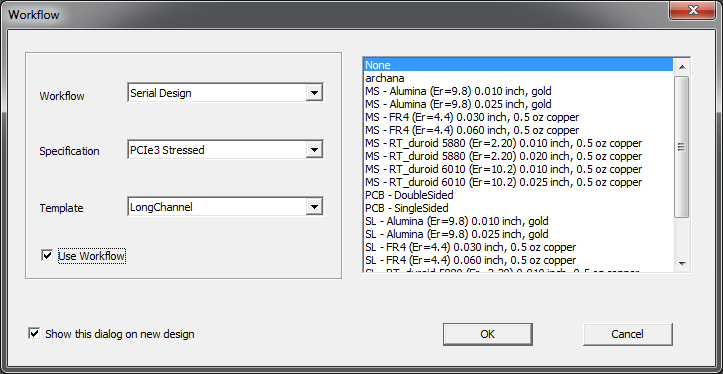
For the workflow dialog to open automatically when a new circuit design is created, the workflow template option must be configured using the General Options for Circuit designs. For more information, see Show Workflow dialog on new design in Nexxim Circuit Design — Global Options.
To save an active design as a workflow template in the Schematic Editor you can do either of the following:
- Click Circuit > Save as Workflow Template
- Right-click a design in the Project Tree and in the submenu that opens select Save as Workflow Template
The information for workflow, specification, and template items is based on data stored in the Workflow directory under Syslib, Userlib and PersonalLib. These data are used to populate the Workflow Ribbon.
Workflow Ribbon
The Workflow Ribbon displays a panel of buttons and menu items that are populated using the python scripts saved in the Workflow directory beneath Syslib, Userlib and Personallib.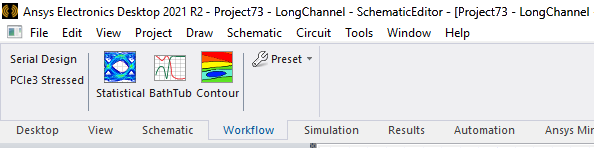
-
Statistical — Adds a VerifEye setup and displays a Statistical Eye plot.
-
Bathtub — Adds a VerifEye setup and displays a Bathtub plot.
-
Contour — Adds a VerifEye setup and displays a Contour plot.
-
Preset — A drop-down menu that allows you to change between different preset options based on PCIExpress 3 specifications.