
Selecting the Correct Element and Method
The following flow chart outlines the process of selecting the correct implementation for an element defined by S-parameters. The two main choices are between the S-element and the W-element, then, for the S-element, between the default state-space representation and the convolution method.
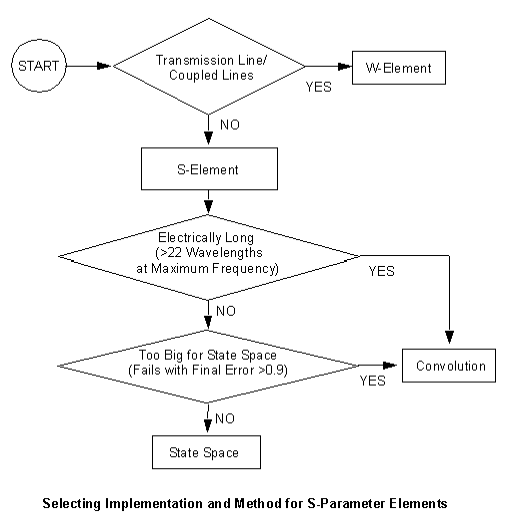
Selecting W-Element or S-Element
The first decision is whether to use a W-Element or an S-Element. W-Element modeling exhibits fewer stability issues than S-element modeling.
- When the S-parameter component to be simulated is a transmission line or a set of coupled lines, use a W-Element that points to an S-model. The S-parameter data must be well de-embedded. The S-model computes the unit RLGC or TABLE model for the W-element from the S-parameters. See Transmission Lines in the Nexxim Components help for details on the W-Element.
- When the element has many ports, has a short electrical length, or is not a transmission line despite a long electrical length, use an S-Element to model the component in Nexxim.
For processing S-elements, Nexxim uses one of two methods—state space or convolution.
Selecting State-Space or Convolution Method
Nexxim must convert the frequency-dependent scattering parameters in the data to a numerical model that is suitable for time-domain simulation. The default representation, a state-space model calculated by fitting methods, is the best method for most applications. The alternative convolution method calculates the impulse response for the element and convolves the impulse response with the data during transient simulation. Convolution should be selected when:
- The circuit is electrically long (greater than 22 wavelengths at the maximum frequency).
- The circuit is too big for the state-space representation. State-space fitting fails with a message such as "Final Error e, unable to achieve acceptable error." The final error e, is larger than 0.9 (e can exceed 1.0 in rare cases, but can never exceed 2.0).
See Convolution Method for details on setting the convolution options.
See the State-Space Method for more on the State-Space representation.