
Running Resonant Frequency Search on the Schematic Editor
The Resonant Frequency Search performs a modified form of oscillator analysis to obtain an initial estimate of the resonant frequency of the circuit. From the Schematic Editor, perform the following steps to set up and run an oscillator resonant frequency search, and view the results.
- Set up the schematic circuit for oscillator analysis by inserting an oscillator probe between two nodes in your circuit. Edit the probe properties and specify an initial guess for the frequency (FREQ parameter) and an initial voltage (A parameter). See Using the Oscillator Probe for details.
- From the Project Manager window, expand the Project Tree and [active design folder]. Then right-click Analysis and select Add Nexxim Solution Setup ... > Oscillator Analysis (N-Tone) to open the Oscillator Resonant Frequency Search window.
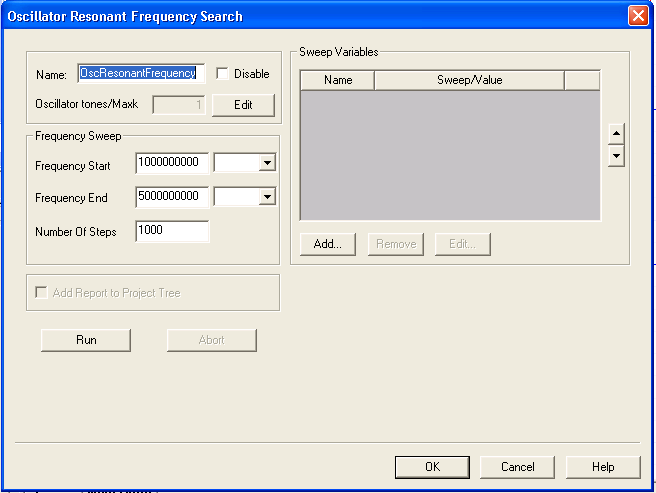
- Type an Analysis Name (or accept the default name, for example “OscResonantFrequency”).
- For most simulations, leave the Disable group box unselected (the default setting). Selecting this box lets you store multiple solution setups for later use. (Note that if a solution setup is deactivated before the analysis is run, any changes made to the design invalidates the simulation results.)
- Click Edit to change the number of tones, the frequencies of the tones, and the maximum harmonic numbers to use for each tone. These settings are reflected in the .OSC statement in the netlist.
- Use the fields in the Frequency Sweep group box to set the parameters for the initial guess, which always uses the frequency sweep method. The settings in this group box generate .OPTIONS statements in the netlist.
- To add a sweep, use the fields in the Sweep Variables group box.
- From the Sweep Variable area, select Add to open the Add/Edit Sweep window.
- In the Variable list, select Temp or the name of a variable (when a variable has been defined for the design), then select one of the following: Single value, Linear step, Linear count, Decade count, or Octave count.
- Type the sweep values into the Value text box (for Single value), or into the Start, Stop, and Step text fields (for Linear, Decade, or Octave count), and ensure that the appropriate units are selected for each.
- For details on sweeps, see Variable Sweep.
- Click Add, then click OK to close the Add/Edit Sweep window and reopen the Oscillator Resonant Frequency Search window.
- Click Run to run the analysis directly on the window.
- If the analysis is successful, Nexxim displays plots of the real and imaginary parts of the probe current. The estimated resonant frequency occurs where the imaginary part of the probe current is zero. This estimated resonant frequency is displayed in the Resonant Frequencies field at the top of the Report.
- After a successful analysis, check Add Report to Project Tree to save the plot under the Results icon in the Project Manager window. The report is added when the setup window is closed with Finish.
- Click Finish to add the solution setup (and the results if selected) to the Project Manager window and exit the window. You can then run the analysis again by clicking on it and selecting Analyze on the menu.
- To run the Resonant Frequency Search analysis on the Project Manager window:
- Locate the resonant frequency analysis setup icon under the Analysis icon on the Project Manager window. Click the resonant frequency analysis setup icon and select Analyze on the menu. The analysis begins immediately and a progress bar appears.
- If the analysis is not successful, an error message appears in the Message Manager window. Check the Message Manager window for an explanation, then take corrective action.
- View results:
- After a successful oscillator analysis, Nexxim displays a message like the following in the Message Manager window, near the end of the messages:
[info]analysis:osc_analysis(info):
Best chance for oscillation detected at 2.28514e_006 Hz (9:15 AM May
20, 2005)
The frequency value is the one calculated for your circuit, and the time and date show the time of the analysis on your machine.
As analysis progresses, oscillator analysis may save messages like the following to the log file:
analysis:osc(status): Probe 0: selecting (node_name1,node_name2) as alternative location 1.
analysis:osc(status): Probe 0: selecting (node_name3, node_name4) as alternative location 2.
The node_names are circuit-specific. If oscillator analysis fails, Nexxim automatically reruns the analysis after moving the probe to alternative location 1. If that analysis fails, Nexxim retries using alternative location 2.