
Q3D RLGC Component Toolkit
Nexxim supports dynamic links with Q3D through state-space fitting on the S-parameter, but it suffers accuracy issues for some areas of applications. The Q3D RLGC Component toolkit supports Nexxim Q3D links through state-space fitting on RLGC data to improve accuracy.
Creating a Component
Complete the following steps to create a component.
-
Open a project with a Q3D design.
-
Insert a circuit design.
-
You can access the toolkit by two ways:
-
Select the Circuit design and browse to the Automation ribbon. Click on Create Q3D RLGC Component.
-
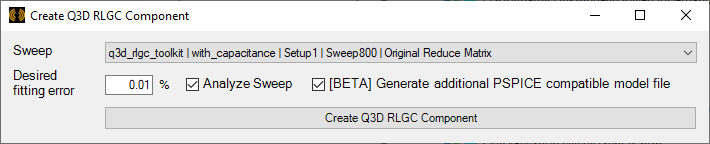
From the Circuit menu, select Toolkit > Q3D RLGC Component to open the Create Q3D RLGC Component window.
-
-
Choose a Q3D solution from the Sweep drop-down menu.
-
In the Desired fitting error field, enter an acceptable error for the RLGC data state space fitting.
-
Check the Analyze Sweep box, if appropriate.
-
Check the [BETA] Generate additional PSPICE compatible model file box, if appropriate. The PSPICE-compatible model is saved in the project directory. RLGC sub-circuit terminals are named after Q3D terminals.
-
Click Create Q3D RLGC Component. The toolkit invokes the state space fitting algorithm to fit the RLGC data and writes a Nexxim subcircuit netlist to generate a schematic component. When it is done, the Info window opens to report success or failure and the new Nexxim subcircuit component appears in the Schematic editor. Use the component to create circuits for Nexxim simulations.
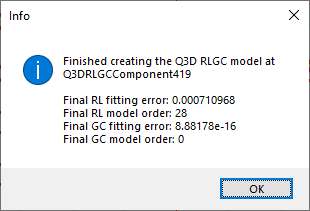
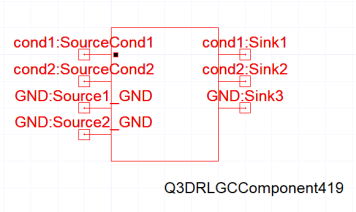 Note: If the [BETA] Generate additional PSPICE compatible model file box is checked, the toolkit opens an explorer window to the directory where the PSPICE-compatible model is stored. The file path is also shown in the Info window.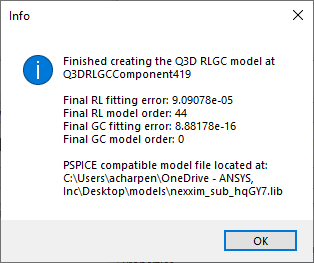
-
Use this component to create circuits for Nexxim simulations.
The procedure is complete.
Automatic Causality Correction
Q3D may return non-causal RL data in certain circumstances. Non-causal data can cause a poor fit when generating a time domain circuit model. Automatic Causality Correction chooses the best fit to the Q3D data between the original S-Parameter data (S-data) and the causal-corrected S-data. A fitting error threshold of 5% on the original fit is used to trigger the correction routine. The threshold is adjustable when generating the model via command line from the .rlgcdata file. Refer to the causality_thresh entry in Running State-Space Fitting on the Command Line.
Passivity Enforcement (Beta Feature)
In simulations where non-passivity of an RLGC PSPICE circuit model export is suspected, the Passivity Enforcement feature can be activated from the command line. Refer to the passive_rlfit entry in Running State-Space Fitting on the Command Line.