
Perform a Phase Noise Analysis
The next exercise is to run phase noise analysis on the oscillator circuit. Nexxim uses the calculated oscillating frequency as the fundamental around which phase noise is computed.
- Expand the Analysis icon in the Project window and double-click the Oscillator_Test_PhaseNoise solution setup to open the Oscillator Analysis window.
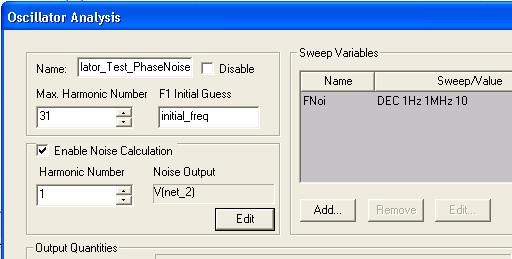
- The Enable Noise Calculation check box is checked.
- The default Harmonic Number is 1, the fundamental oscillating frequency.
- In the Sweep Variables group box, a sweep of the noise frequency Fnoi has been set up. The sweep is a Decade count, from 1 Hz to 1 MHz using a count of 10.
- Click Edit under the Noise
Output field. The Noise Output window opens:
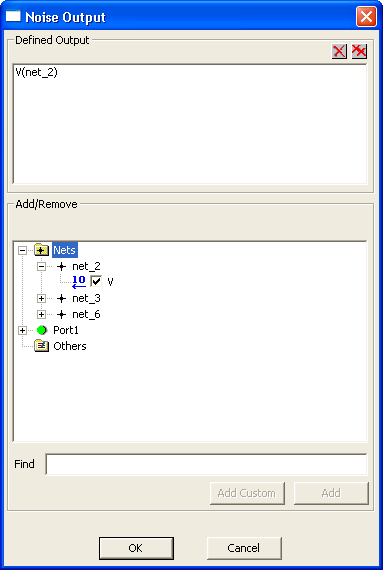
- Expand the Nets icon, and then expand the net_2 icon. The V group box under net_2 is selected as the output. The Defined Output group box shows V(net_2).
- Click OK to close the Noise Output window and return to the Oscillator Analysis window.
- Click Finish to close the Oscillator Analysis window.
- Expand the Analysis icon in the Project window, right-click the Oscillator_Test_PhaseNoise solution setup, and select Analyze on the menu. The oscillator analysis runs. The Progress window displays a red line to show the progress of the analysis.
- When the analysis has completed, the Message
window reports the oscillator RMS jitter:
analysis:osc(info): Oscillator root mean square jitter is 5.57352e-014 seconds (7.99402e-007 radians) per oscillation
- Right-click the Results icon
in the Project Manager window and select the PhaseNoise report setup.
The Report window opens:
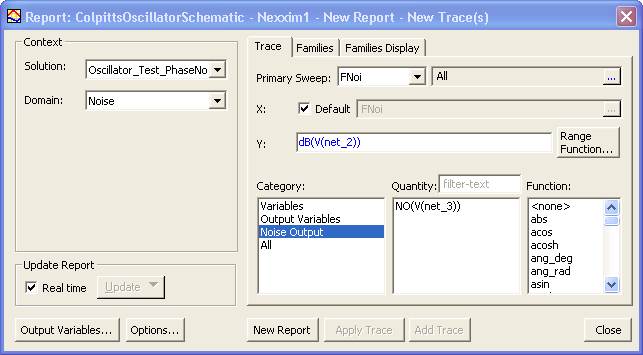
- The Solution is Oscillator_Test_PhaseNoise.
- Noise is the Domain.
- Noise Output is the Category.
- The X-axis is the sweep of noise frequency Fnoi.
- the Y-axis is the noise output dB(V(net_2)).
- Click New Report to generate the report.
- Click Close to close the Report window.
- The Report window opens with a graph of
the result:
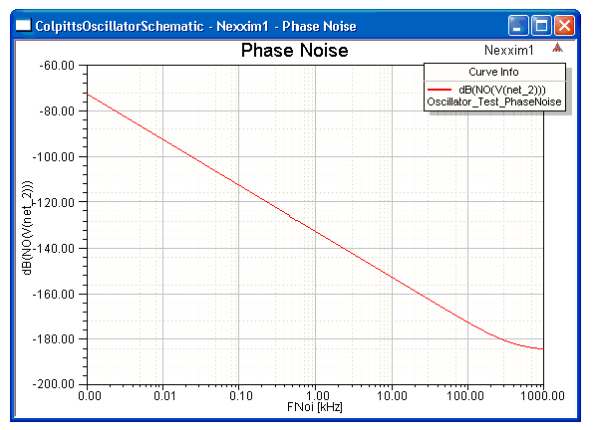
- The X-axis has been modified
to show the double-logarithmic form that is commonly used for displaying
phase noise. To see the modifications, double-click the X-axis label
“Fnoi [MHz]” to open the X-Axis Properties window. Select the
Scaling tab:
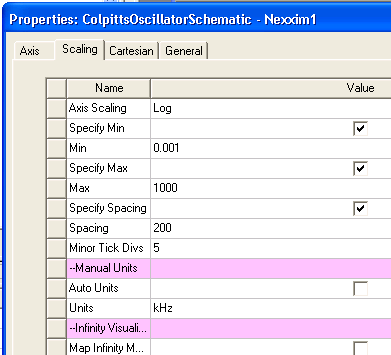
- AxisScaling is Log scaling (default is Linear). Min is 0.001, Max is 1000, and Minor Tick Divs to 5. The Auto Units option is deselected, and the Units are Khz.
- Click OK to close the X-Axis Properties window.
- Close the Project when you are finished viewing the graph.
For more information, see Nexxim Oscillator Analysis.