
Nexxim Circuit Design — Local Options
To set option defaults that affect a particular circuit netlist design, on the Project Manager window, expand the Project Tree. Then right-click the active design and select Design Settings ... to open the Design Settings window.
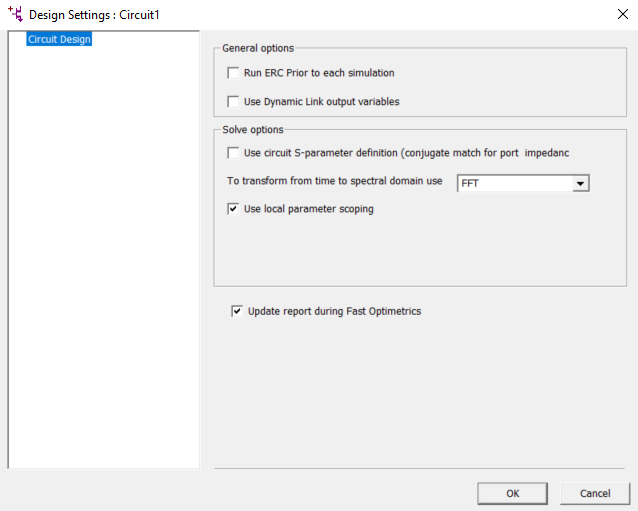
General Options
Run ERC Prior to each simulation — Runs electrical rules checking for nets or nodes that are electrically connected but not physically connected. The ERC results display in the message window. The simulation proceeds regardless of the results of ERC.
Use Dynamic Link output variables — Enables the Nexxim simulation to use output variables from dynamically linked HFSS designs. Using the HFSS output variables gives Nexxim access to nearly all types of HFSS data instead of just S-parameters. However, accessing the HFSS output variables can slow down the analysis. See Access to HFSS Output Variables for further information.
Solve Options
Use circuit S-parameter definition — Controls the definition for port impedances. For Nexxim, this option should typically be selected (check box checked). The definition of a “matched port” depends on the application. In applications that deal mostly with circuit quantities (including the Nexxim simulator), a “matched port” has a characteristic impedance that maximizes the power transfer. This is also called a “conjugate match.” In applications that deal mostly with electromagnetic quantities (including HFSS and Planar EM), a “matched port” has a characteristic impedance that maximizes the transfer of the voltage wave. The two definitions differ only by the conjugate of the characteristic impedance of the port. For real port impedances, there is no difference.
To transform from time to spectral domain use — Allows you to select the method used to transform on the time domain to the spectral domain for all projects.
- Fourier Integration is very accurate but may be time-consuming for large data sets. The Fourier Integration method computes the projection of the signal on each of the requested harmonics via integration of the inner-product integral.
- FFT (Fast Fourier Transform, the default) achieves faster conversion with a slight reduction in accuracy. The FFT method samples the signal at 2*(maximum harmonic number) points, and outputs the FFT of the sampled signal. The FFT method may not be robust enough to avoid aliasing while converting some time-domain signals to the frequency domain.
Use local parameter scoping – Controls the precedence of parameter handling in subcircuits. By default, option PARHIER=local is inserted in the Nexxim netlist. Uncheck the box to restore global parameter scoping. See Overriding the Precedence of Subcircuit Parameters for further information.
Update report during Fast Optimetrics – If a report has all variables set to "nominal", the report is updated during fast-optimetrics if this option is checked.