
Bypass in Solver On Demand
The Bypass Solver-on-Demand model allows you to auto-generate netlists to bypass a component through .CONNECT expressions. Using the Bypass definition window, customize the pin connections of a component. For two-port components, a Bypass model is created automatically. For components with more than two ports, it is necessary to define the Bypass pin mapping.
In the Solver-on-Demand tab of the Edit Component window, choose Bypass on the model drop-down menu and click Add to open the Bypass window. Alternately, If a Bypass model is already listed in the Edit Component window, click in the Define Model Value field to open the Bypass window.
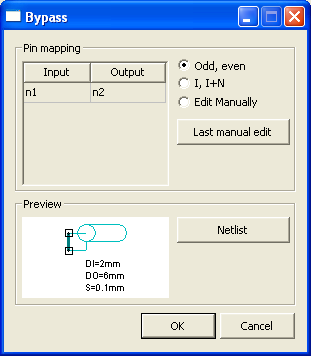
- The Bypass window displays the current pin mappings.
- Select Odd, even or I, I+N to use a predefined pin combination.
- Click Edit to manually define connections. To define a connection, in the pin mapping grid, first select on the Input drop-down menu, then select from the Output drop-down menu.
- Select Last manual edit to cancel any changes you have made and return to the last saved pin combination.
- Select Reset to reset the pin combinations to their preset defaults.
- Click Netlist to see the Bypass netlist.
- Once the pin combination is defined, a preview of the component's design is displayed in the Preview window.
Click OK to save your changes and close the window, or click Cancel to close the window without saving any changes.