
AMI Receive Jitter Parameters
Receive jitter and noise are specified using the Receive Jitter/Noise Distribution group box on the Report setup window. For AMI analysis simulations (including statistical analysis using VerifEye with AMI), the values of the parameters may be provided by the simulation. Values may come on the .ami file at import time (and potentially be modified by the user in the Properties window for the Rx device), or may be returned by the AMI model after the call to AMI_Init(). In either case, the values provided by the simulation are used to initialize the Jitter/Noise window.
Receive Jitter/Noise Distributions. Receive jitter and noise can be added or modified in the Reports window. For AMI, the Distribution group box appears when you select EyeAfterProbe for the Bathtub plot:
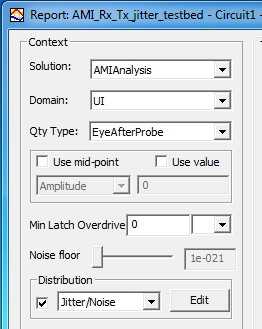
Click Edit to open the Jitter/Noise Distribution window.
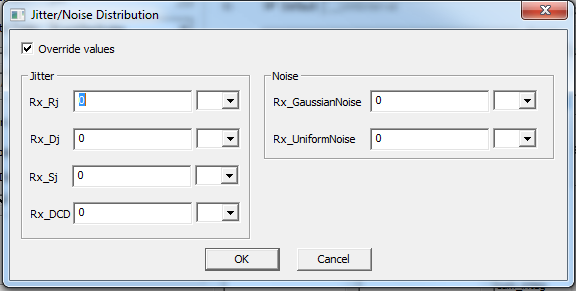
The parameter names and definitions are as defined in the IBIS specification.
- For random receive jitter (Rx_Rj) the value is the standard deviation of the Gaussian distribution in time units. The default is 0 seconds (overridden when the AMI file contains a value for Rx_Rj).
- For uniform receive jitter (Rx_Dj) the value is one-half the width of the jitter distribution in time units. Default is 0 seconds (overridden when the AMI file contains a value for Rx_Dj).
- For sinusoidal jitter (Rx_Sj) the value is the amplitude of the distribution in time units. Default is 0 seconds (overridden when the AMI file contains a value for Rx_Sj).
- For clock duty cycle distortion (Rx_DCD) the value is one-half the peak-to-peak variation of the distortion in time units. Default is 0 seconds (overridden when the AMI file contains a value for Rx_DCD).
- For random receiver noise, (Rx_GaussianNoise) the value is the standard deviation of the Gaussian distribution in voltage units. The default is 0 volts (overridden when the AMI file contains a value for Rx_GaussianNoise).
- For uniform receiver noise (Rx_UniformNoise) the value is one-half the width of the noise distribution in voltage units. Default is 0 volts (overridden when the AMI file contains a value for Rx_UniformNoise).
Receive Jitter Parameters in the AMI File. If the AMI file contains receive jitter parameters, they are imported into the receiver component and displayed with the AMI Properties. Note that the quantities in this Properties listing may be in terms of fractions of the UI (as in the following example), or in absolute times.
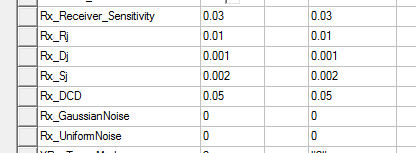
If there are receive jitter parameters in the AMI file, they is copied into the Receive Jitter window during simulation. When the AMI receive jitter parameters are copied into the Jitter/Noise Distribution window, they are converted to absolute times if necessary. The window in the following diagram illustrates the fractional UI values on the example above converted to absolute times in seconds.
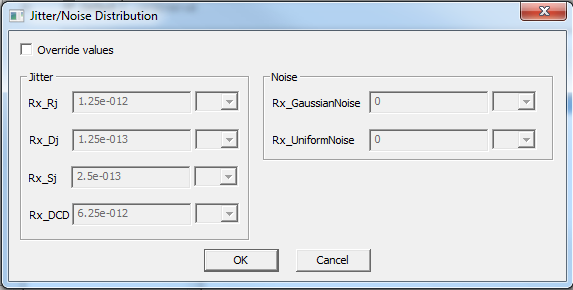
When you create a bathtub plot of the EyeAfterProbe quantity, any values provided by the AMI simulation are used to populate the Jitter/Noise window if the user chooses to add the Jitter/Noise distributions. Modify these values in the window. When the AMI model does not include receive jitter parameters, enter the jitter parameters manually.
When the Jitter/Noise distribution box is checked for a bathtub plot of the EyeAfterProbe, four traces are available for plotting:

The quantities are the bathtub without jitter applied, the bathtub with noise and jitter applied, and the distributions that represent the Jitter and Noise parameters.