
PSPICE Library Import Procedure
To import a PSPICE library or one of its components in a Circuit schematic:
- View the Component Libraries.
Open the Symbols area. Click Models.
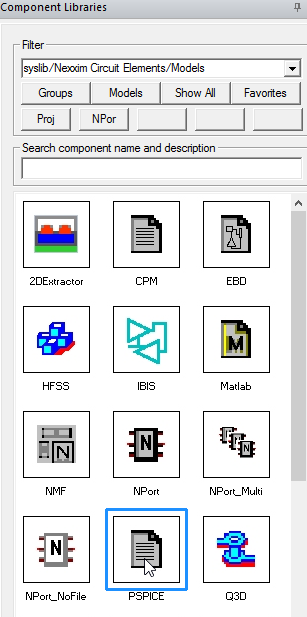
- From the area of icons, select the PSPICE icon to open the Select Model File window.
- The Files of type menu lists the file types for the PSPICE file. You can import a PSPICE library (.lib) or a PSPICE subcircuit definition (.cir, .spc, .sp). You can specify the location of the PSPICE file by clicking Use Path, PersonalLib, UserLib, or SysLib.
Within the PersonalLib, userlib, or syslib folder, select the file from those listed, or type the name of the file in the File Name area. Note that syslib is reserved for libraries supplied with the Ansys Electronics Desktop (AEDT)TM electronics systems design platform. See Paths for Model File Selection for details.
- Click Open in the Select Model File window.
The window lists all the SPICE components that are contained in the library.
- Check a box in the Create Component column for each component you wish to import.
- Click the Symbol and Footprint column boxes to assign a symbol and footprint to a component. These steps are optional; if either one is left unspecified, a default symbol or footprint is created automatically.
- Click OK.
- click the Select Component window to select one or more library components.
- Select OK to import the selected components and display their names in the Project Manager window.
The global tab of the netlist for the component includes lines (shown in bold) to switch to the PSPICE parser for this library, then back to Nexxim for the rest of the netlist:
simulator lang=pspice
.inc "C:\Documents\Ansoft\PersonalLib\Component Data Files\Component Data Files\PSpice\BC8\\
simulator lang=nexxim
Once the component has been placed in the schematic, its Property Window will show a checkbox property named NetlistAsSubcircuit. Enabling the checkbox affects only what is written to the netlist for simulation. When the checkbox is enabled, the Spice model component will be netlisted inside its own subcircuit along with its file reference. This means the model name (taken from the Spice file) cannot conflict with the same model name in a different Spice file netlisted for a different component. If two Spice files with identical model names are read into the global scope, only data from one of the spice files will be used for all components referencing that model name, causing a simulation error. Checking the ”NetlistAsSubcircuit” property will move the file out of the global scope and prevent this problem.
For more information about AEDT libraries see Using the Component Editor.