
Example: Simple Power Train
This example illustrates a Twin Builder design for a simple motor power train consisting of a PMSM (Permanent Magnet Synchronous Motor) and other components taken from the Twin Builder component libraries that are used to drive a load, which is a Modelica gear shift component that has been modeled in the Modelica environment.

In Twin Builder schematic shown above, the current sources, PMSM component, and all components (except the circled Modelica gear shift component) are from Twin Builder component libraries. The Modelica gear shift load is modeled in the Modelica environment.
The figure below shows the internal diagram of the gear shift Modelica model. It is based on the Modelica.Mechanics.Rotational.Examples.SimpleGearShift in the Modelica Standard Library. It shows how an automatic gear shift is built up from a planetary gear, a brake, a clutch, and related Modelica components. The basic operation of the model is as follows:
- In the beginning, the clutch is free (disengaged) and the brake prevents the ring of the planetary gear from moving. Thus the gearRatio = 1/(1 + planetary.ratio).
- At time = 2 s, the brake releases the ring of the planetary gear, while the clutch blocks the ring and the sun gear. Thus we obtain a gearRatio = 1.
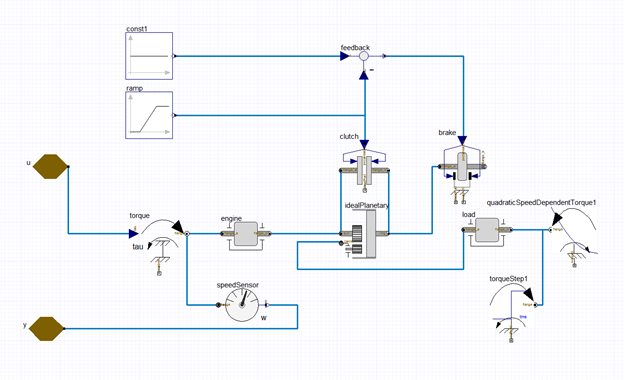
This example is based on the following example project located in the Modelica Tutorial Examples folder:
<Installation location>\Examples\Twin Builder\Modelica Tutorial\Tutorial Examples\SimplePowerTrain.aedt
Simple Power Train Example Workflow
In this example, we will create a Modelica gear shift model, then add it as one component in a larger Twin Builder Power Train design that includes a permanent magnet synchronous motor and supporting components taken from Twin Builder's component libraries. We will then analyze its performance in the Twin Builder environment. The following steps outline the process for accomplishing these goals.
- Add a new project and Modelica Model in Twin Builder.
- Place the Modelica components for the simple power train model into the Diagram Editor.
- Connect the Modelica simple power train components.
- Assign the various simple power train component properties.
- Compile and update the Twin Builder project.
- Add the Modelica component to the Twin Builder Schematic.
- Add Twin Builder Components to the design and add connections.
- Assign properties to the Twin Builder components.
- Define outputs and Create Reports for the simple power train design.
- Set up and run a Transient analysis for the simple power train design.