
Twin Builder Modelica Connector Library
The Twin Builder connector library provides the convenience and ability to create Modelica models/subsystems with conservative connections in a Twin Builder schematic.
The primary goal is to simulate in the Twin Builder environment, so the connectors are mainly compatible with Twin Builder’s conservative connections – that is, only one potential variable and one flow variable in the connector are supported. You need to use or create a compatible connector in the Modelica environment.
For example, in the Modelica Standard Library, FluidPort in Fluid has more component elements defined in the connector, so you must create a Twin Builder-compatible connector to connect to the provided Twin Builder Modelica connector to successfully compile the model.
Because of the Modelica Standard, in a connect-equation the two connectors must have the same named component elements with the same dimensions; recursively down to the primitive components. The primitive components with the same name are matched and belong to the same connection set.
Modelica models that use connectors from the Twin Builder Connector library are not supported when you enable the Use External Solver option. In such cases, potential and flow variables are exposed through different pins in the Modelica component when placed on the schematic.
Structure of Connector Library
The Twin Builder Modelica Connector library loads into the component manager in the Twin Builder Modelica environment as shown below:
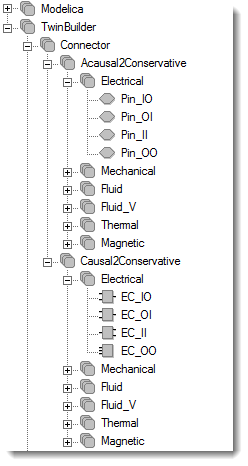
It contains two subcategories: Acausal2Conservative and Causal2Conservative Each subcategory has the following domains:
- Electrical
- Mechanical (Rotational, RotationalV, Translational, and TranslationalV)
- Fluid
- Fluid_V
- Thermal
- Magnetic
The Acausal2Conservative subcategory is for directly exposing conservative connections from Modelica’s acausal connector. Two examples are shown in Examples. The connectors are named with preferred calculated directions for potential variable and flow variable based on your Modelica application. For example, Pin_IO means the preferred calculation of this electrical pin is voltage as input and current as output.
The Causal2Conservative subcategory is convenient if you already have non-conservative designs in Modelica with a previous version of the Modelica environment and want to connect to conservative connections in the Twin Builder schematic. The Causal2Conservative connector models have two causal pins to be connected for the Modelica side, and one domain acausal pin to be connected in the schematic after compilation.
In the Simplified Motor Driven Power Train example, the Causal2Conservative connector needs to be used together with the compatible Acausal2Conservative connector.
You need to find the compatible pair of the connectors based on their application for successful compilation and simulation in Twin Builder.
Examples
Two demo RLC examples are shown. You can either compile the RLC Modelica model separately, bring it into Twin Builder, connect and simulate it, or combine the RLC circuit as a subcircuit in the Modelica environment, compile and bring one component into Twin Builder, and simulate.
One demo Simplified Motor Driven Power Train example is shown for Causal2Conservative connection.
RLC Individual
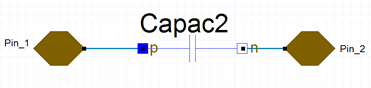
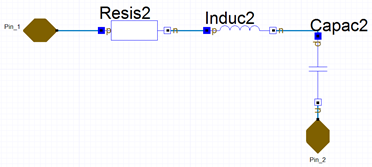
To create an individual RLC model in Modelica, connect proper pins in the Twin Builder Connector library and connect them to the resistor, inductor, and capacitor models separately as shown below:
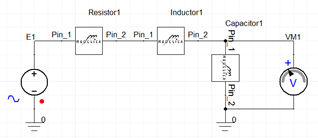
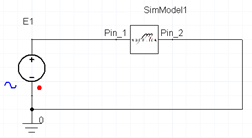
Compile them into Twin Builder components, then connect and simulate. The Twin Builder circuit is shown below:
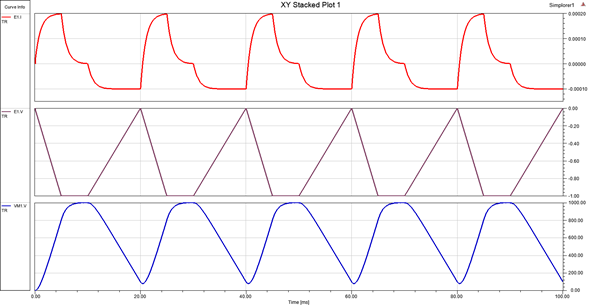
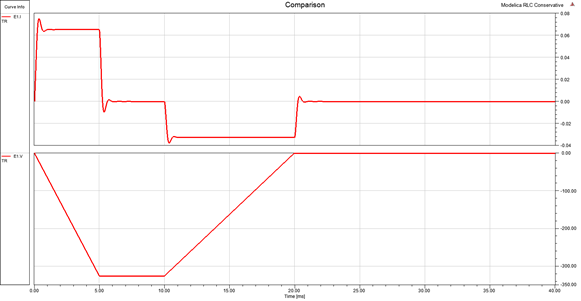
With R = 1000 Ohm, L = 0.01 H, and C = 1e-6 F and a periodic Trapezoidal voltage source, the simulation results are shown below:
The design is in this location:
<Ansys EM Installation> \Win64\Examples\Twin Builder\Modelica\Twin Builder Modelica Connectors\Acausal_Conservative\RLC_individual.aedt
RLC Integrated
Another way is to combine the subcircuit in the Modelica environment.
The Twin Builder circuit is simple:
With R = 1000 Ohm and with a non-periodic Trapezoidal voltage source, the simulation results are shown below:
The Twin Builder design can be found in this location:
<Ansys EM Installation> \Win64\Examples\Twin Builder\Modelica\Twin Builder Modelica Connectors\Acausal_Conservative\RLC_integrated.aedt.
Simplified Motor Driven Power Train_conservative
This example demonstrates the usage of Causal2Conservative connectors. Easier to understand, an application example from Twin Builder installation (<Ansys EM Installation> \Win64\Examples\Twin Builder\Applications\Modelica\ Simplified Motor Drived Power Train.aedt) is selected.
The original schematic is shown below:
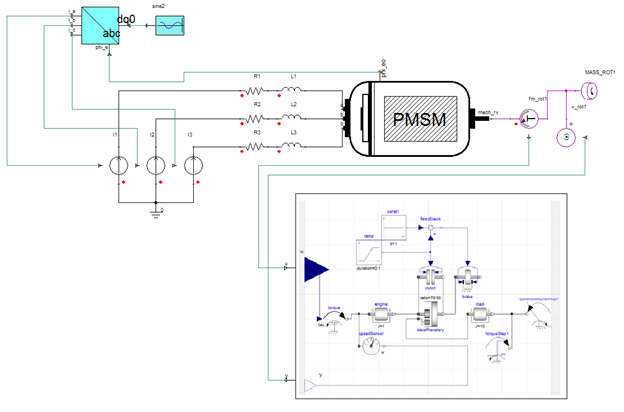
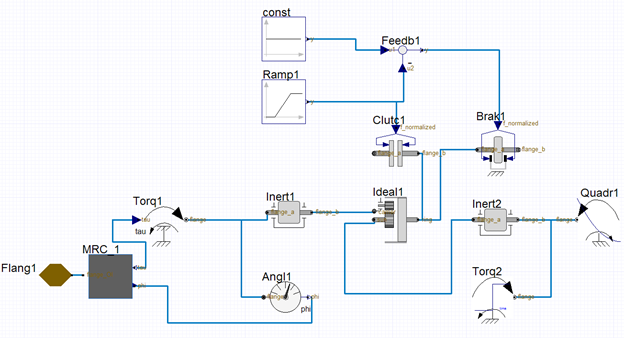
Using the Twin Builder Modelica Connector library, the acausal to conservative connection can be easily established with a pair of Causal2Conservative and Acausal2Conservative connector based on existing application. The actual Modelica model is shown below with Mechanical Rotational Causal2Conservative connector MRC and Acausal2Conservative connector Flang.
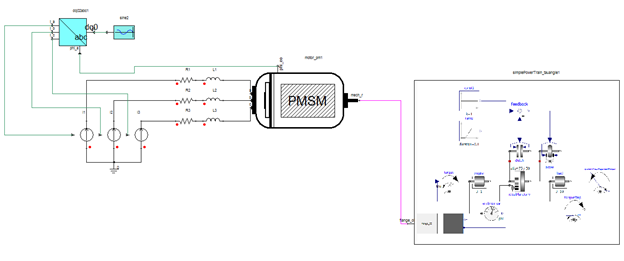
The Twin Builder design with compiled Modelica subsystem:
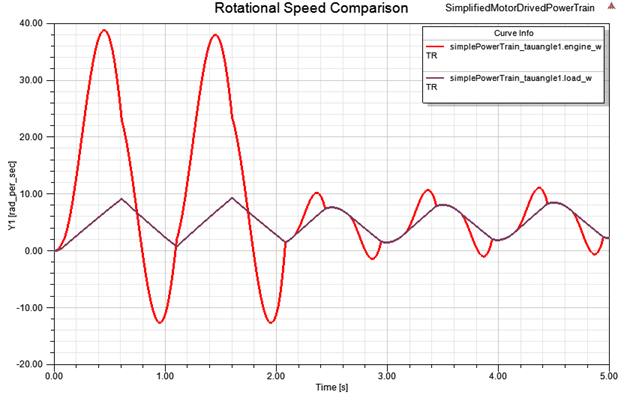
Rotational speed comparison of the subsystem engine and load is shown below.
The Twin Builder design can be found under
<Ansys EM Installation>\Win64\Examples\Twin Builder\Modelica\Twin Builder Modelica Connectors\Causal_Conservative\MotorDrivenPowerTrain.aedt.