
Advanced Settings for Characterizing a Power Mosfet
Click Adv. Settingsin the Dynamic Model Input [10/12] dialog box to access the advanced settings of basic dynamic IGBT characterization. There are two tabs: Extraction Settings and Model & Goal Settings.
- Extraction Settings
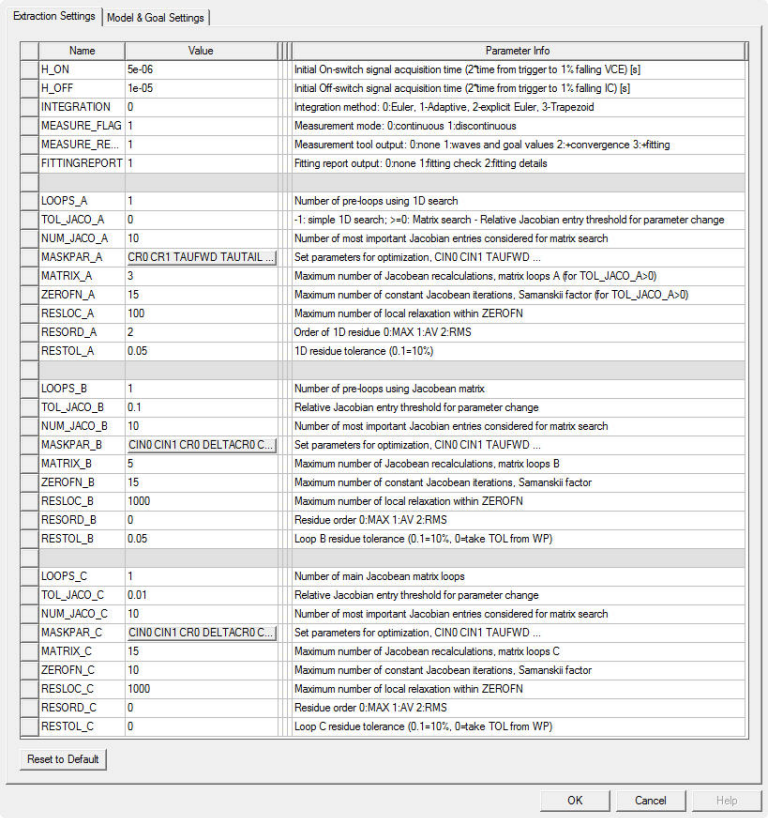
Advanced Parameter Setting Dialog Box
These settings allow for more control over the characterization process. It should not be necessary to change them for most devices.
|
Parameter |
Information |
||||||||||||||||||||||||
|
H_ON and H_OFF |
Before preprocessing and interpolation of the on/off switch wave forms, a series of simulated data points must be stored temporarily. These parameters set the acquisition time for the data points. This time interval setting limits the amount of acquired data and must fit to the longest possible time constants at the on/off switch together with a remaining time buffer to allow the Jacobean entry calculation which sweeps every parameter in a wide range. The sensitivity analysis for the 1D search in loop A varies actual parameters from p-25% ... p+50% and the Jacobean-based method does a parameter variation in the range p-10% ... p+10%. This process repeats several times to calculate either the actual best fitting single parameter or a parameter to goal sensitivity coefficient. Thus, the transient wave form duration will vary in a wide range. H_ON and H_OFF are the initial settings for the On-switch and OFF-switch signal acquisition times. The actual Hon and Hoff values change during the characterization. Hon and Hoff derive from the measured switching times and length of the reverse recovery. 5x…10x of the On-switch/reverse recovery time should be a good value. For SiC devices, the values should be much smaller than for Si devices. If the initial values are not good, the extraction process can not determine the sensitivity of parameter changes to the output signal, and the extraction will not start to converge. You can observe the convergence of the extraction on the Fitting info page and adjust the initial values for H_ON and H_OFF if necessary. |
||||||||||||||||||||||||
| INTEGRATION | Integration method (0 - best for switching devices). | ||||||||||||||||||||||||
|
MEASURE_FLAG |
Measurement mode (1 – allows for stop of measurement cycles as soon as good result is reached). |
||||||||||||||||||||||||
| MEASURE_REPORT | Measurement tool output (should stay 1). | ||||||||||||||||||||||||
| FITTINGREPORT | Fitting report output (should remain set to 1). | ||||||||||||||||||||||||
|
LOOPS_A, LOOPS_B, and LOOPS_C |
Approaching the optimal parameter set is an iterative procedure. This iteration is split into three sequenced loops A, B and C. Each of the sequences can be repeated any number of times according to LOOPS_x. This is especially helpful in the case of loop A, which is a predefined sequence of one dimensional parameter sweeps. In some special cases an increased number LOOPS_A results in much better initial parameter values before starting the Newton-Raphson-based matrix loops B and C. Default values are LOOPS_A:=0, LOOPS_B:=1, and LOOPS_C:=1. |
||||||||||||||||||||||||
|
MASK_PAR_A |
This is a list of dynamic model parameters which take part in the 1D parameter sweep sequence. The input is interpreted as a parameter mask for parameter selection during the characterization. Parameter names in bold mark the values included by default.
A repeated application of loop A helps to find a good initial parameter guess for the following Newton-Raphson-based loops B and C. The above table also shows the most likely parameter-to-goal impact which is useful in case of manual parameter optimization. |
||||||||||||||||||||||||
|
MASK_PAR_B and MASK_PAR_C |
Lists of dynamic model parameters which take part in the Newton-Raphson-based parameter optimization by error minimization. The following parameters are recognized. The parameters included by default are in bold letters.
|
||||||||||||||||||||||||
| NUM_JACO_A, NUM_JACO_B, and NUM_JACO_C |
This parameter defines which entries from the sensitivity matrix are considered for the matrix search: -1: largest column, 0: apply threshold >0: this number of largest entries. For Loops_A when simple 1D search is used, this parameter is ignored. |
||||||||||||||||||||||||
| TOL_JACO_A, TOL_JACO_B, and TOL_JACO_C |
This parameter defines the relative threshold for Jacobian entries used in the matrix search (when NUM_JACO_x = 0). For LOOPS_A, set the parameter to -1 which switches LOOPS_A to simple 1D search. |
||||||||||||||||||||||||
|
RESORD_A, RESORD_B, and RESORD_C |
This is the order of the residual. The number range is 0 .. 2: 0 – The maximum error is the residual value (the error number). 1 – Absolute error average. 2 – Root mean square error value. If the initial parameter set is far off the optimum solution (for example, RESORD_A) this parameter should be 2. toward the optimal solution, to achieve a certain error limit (for example, RESORD_C) this parameter should be 0. |
||||||||||||||||||||||||
|
RESTOL_A, RESTOL_B, and RESTOL_C |
Desired accuracy of the residual according to the RESORD setting. To quickly move the model parameters toward the optimum, the tolerance can be set as large as 0.2 = 20%. The number of necessary loops A, B and C will decrease strongly. It is suggested to use the final accuracy only in the last main loop (usually loop C). Relaxing the accuracy can result in a noticeable reduction of simulation time. |
||||||||||||||||||||||||
|
MATRIX_A, |
Within A (when matrix search is used) and within loops B and C, the recalculation of the Jacobean matrix will be done this number unless the residue falls within the accuracy region. MATRIX_B and MATRIX_C are the maximum numbers of Jacobean re-calculation, which takes most of the simulation time. In terms of pure mathematics, the recalculation should be done in every iteration cycle to stay close on the direct path to the optimum. It turns out to be a good trade-off between the shortest path and the simulation duration to leave the Jacobean untouched for some iterations before its recalculation by simulation. For loop A when simple 1D search is used, this parameter is ignored. |
||||||||||||||||||||||||
|
ZEROFN_A, |
This is the number of iterations without changing the Jacobean (system) matrix. Only the right side of the balance system—the so-called zero function—is changed in every iteration step. This residue calculation is much faster and drives the parameter changes in roughly the right direction toward the optimum solution (the optimum parameter set). These values are called Samanski factors. For loop A when simple 1D search is used, this parameter is ignored. |
||||||||||||||||||||||||
|
RESLOC_A, |
Numbers of local residue (under-relaxation values differ between parameters) use before the system is considered to become stiff and hard to solve. After RESLOC_x total iterations for under-relaxation and boosting the main diagonal of the Jacobean, no longer is each parameter treated separately but all together globally the same way (under-relaxation values equal for all parameters), which slows down the convergence considerably but forces the solution path back to the optimum path. The additional convergence control stays unused by large RESTOL_x numbers to save time and to make the optimization feasible. For loop A when simple 1D search is used, this parameter is ignored. |
- Model & Goal Settings
You can choose dynamic fitting goals in Select Goals to Display. The checked goals appear in the table of the Dynamic Model Input dialog box [10/12], so it can be included as fitting goals during extraction.
You can also adjust the dynamic model type in Adv. Model Settings. Each drop-down list corresponds to one digit of parameter TYPE_DYN in the basic dynamic IGBT model. For more detail, see the documentation for the Power MOSFET Model (Basic Dynamic).