
Using the S2M Utility
The Single to Mixed (S2M) module converts single-ended parameters into mixed-mode parameters. Multi-port single-ended ports are then paired to generate differential positive or negative ports. These ports can then be excited in common mode or differentially.
To access the S2M Utility from SUtility:
- Select one single-ended project from the projects list. Ensure that the number of ports is a multiple of four.
- Click Utilities > Single To Mixed.
The Single To Mixed window appears.
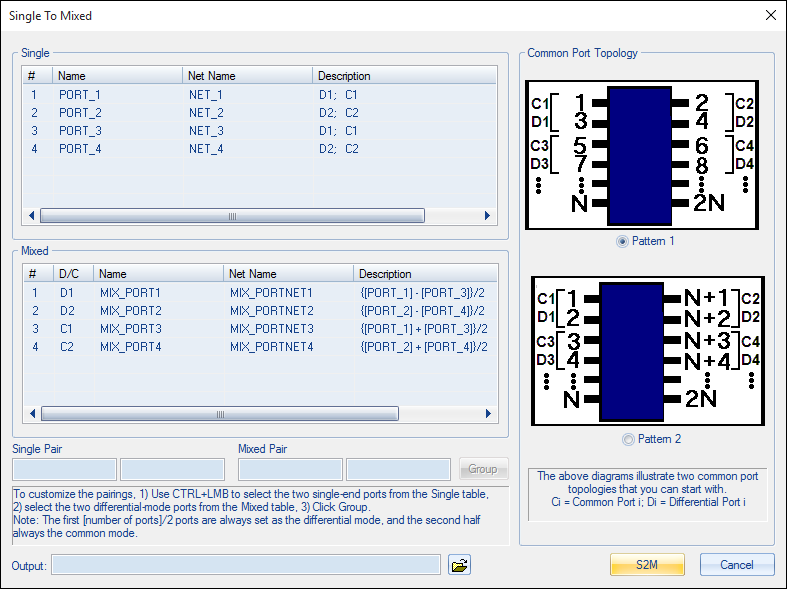
The Single table shows single-ended ports, and the Description column shows the differential and common modes to which it belongs.
The Mixed table shows mixed-mode ports that will be generated. The D/C column indicates whether the mixed-mode port is the differential-mode or common-mode excitation of the paired single-ended S-Parameters. Port and net names are editable by double clicking on the cell. The Description column shows how the differential and common-mode voltages are being defined.
From the mixed-mode output port sequence, the first ([number of ports]/2) ports are always defined as the differential-mode voltages and currents; the next half are always defined as the common-mode values.
To specify port pairings and begin analysis:
- Use the radio buttons to select a Common Port Topology:
- Pattern 1 pairs single-ended port 1 and 3 together and generate the common and differential-modes 1. Similarly, single-ended port 2 and 4 are paired to generate the common and differential modes 2, and so on.
- Pattern 2 topology indicates that the single-ended port 1 and port 2 will be paired together to generate the common and differential modes 1. Single ended ports 3 and 4 will be paired to make common and differential modes 3, and so on. The mixed mode port sequence is always arranged in the alternating fashion, regardless of the single-ended port pairings.
- Alternatively, you can customize the pairing using the Mixed table. To set up a pairing, select two single-ended ports (from the Single table) that you want to pair and the mixed differential and common mode ports (from the Mixed table) that you want associated with the selected single-ended ports. Click Group to apply the pairing. The Description fields for both the Single and Mixed table should be updated for the selected items to reflect the new grouping. Mixed-mode ports are always arranged such that the first ([number of ports]/2) ports are the differential ports, and the second half are the corresponding common-mode ports. When you click on any mixed-mode ports, the other mode is automatically selected as well.
- Enter the Output file name to specify the output file containing the results.
- Click S2M to start the analysis.
The results are loaded and plotted in the main SUtility window.