
Merging Nets
You can merge two or more nets together using the Net Operations toolbox on the Tools tab.

You can either force selected nets to merge into one destination net, even if the nets are disconnected electrically, or merge nets into groups based on their electrical connections.
Merging Selected Nets
To merge selected nets:
- From the Nets workspace, select the nets you want to merge. Selected nets display with checked boxes.
- Click Tools. From the Net Operations box, click the Merge Selected Nets (
 ) icon.
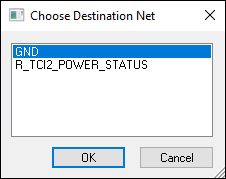
 - Select the net you want to be the destination, and click OK.
The Choose Destination Net window appears.
SIwave automatically merges all electrically connected nets in the set, typically resulting in a smaller set of nets after merging.
Merging Connected Nets
To merge connected nets:
- From the Nets workspace, select the nets you want to merge. Selected nets display with checked boxes.
- Click Tools. From the Net Operations box, click the Merge Connected Nets icon (
 ).
).
SIwave automatically merges all electrically connected nets in the set into a single net. The destination net is chosen arbitrarily. The Messages window displays information about the merged and destination nets.