
Measuring Distances
SIwave allows you to measure the distance between points and spacing between edges.
To measure data, click Tools. From the Inspection Tools area, click Measure.
The Measure Data window appears. You can dock or hide it by right-clicking anywhere in the window.
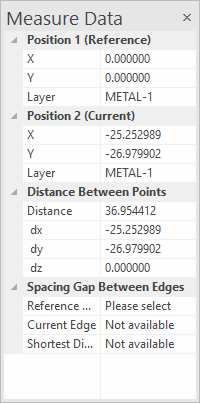
Before measuring data, ensure you are in Select by Clicking mode on the Home tab.
To measure the distance between two points:
- Click any point for a reference coordinate. This is displayed as Position 1.
- Move the cursor in the Modeling workspace to see the values for Position 2 and Distance between Points.
- The data updates as the cursor is moved. The shape of the cursor changes when it is snapped to a corner or mid-point.
To measure the shortest distance between two edges:
- Select an edge in the Modeling workspace. This is displayed as the Reference Edge.
- Move the cursor over another edge to see the values for Current Edge and Shortest Distance.