
Information/Errors/Warnings Workspace
The Information/Errors/Warnings workspace displays certain messages pertaining to the project.
- Information – general status and properties messages. These are denoted by a white circle containing the letter i.
- Warnings – notifications of issues that may affect simulation capabilities. These are denoted by a yellow triangle with an exclamation point.
- Errors – notifications of failures. These are denoted by a red circle containing the letter x.
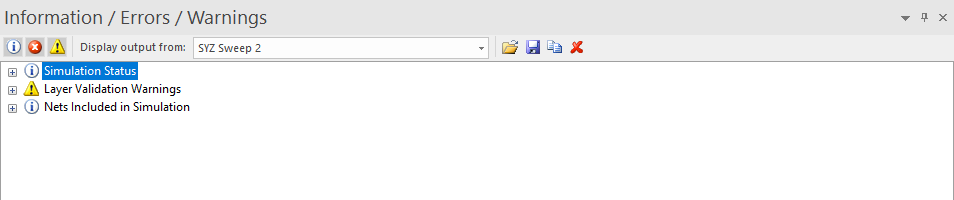
You can choose which types of messages (information, warnings, errors) to display using the icons at the top-left of the window.
The Display output from drop-down menu allows you to select the simulation for which to view results.
Using the Save and Open icons, you can save the contents of the Information/Errors/Warnings file as a Workplace transcript file (*.iew), and open previously saved .iew files.
You can copy the Information/Errors/Warnings window contents using the Copy button, and paste the information into any text editor.
You can also clear the contents of the window using the red X on the right-hand side of the toolbar.
Exit Codes
When SIwave runs a simulation, the Information/Errors/Warnings workspace displays an exit code.
The table below lists some common codes and their meanings:
| Code | Description |
| 0 | Successful simulation. |
| 1 | Unknown failure. |
| 2 | SIwave couldn't open file. |
| 3 | SIwave couldn't read file. |
| 4 | SIwave couldn't write to file. |
| 5 | Invalid solver inputs. |
| 6 | No source file defined. |
| 7 | Illegal geometry or connections found. |
| 8 | Invalid trace cross section. |
| 12 | Could not solve resonant modes. |
| 13 | Singular matrix. |
| 14 | Failed to mesh, or invalid mesh. |
| 100 | Insufficient memory to solve. |