
Importing IPC2581 Design
IPC-2581 is an open-source standard developed by the Institute for Printed Circuits IPC-2581 Consortium in 2004.
For more information, visit the IPC-2581 website.
To import an existing IPC-2581 file into SIwave:
- Click Import > IPC2581.
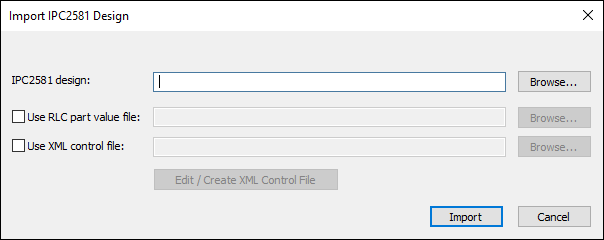
- Select the IPC2581 design file for import. You can select a *.cvg or *.xml file.
- If you want to specify an RLC part value file, check the Use RLC part value file check box and click Browse to select it.
- If you want to specify an XML control file, check the Use XML control file check box and click Browse to select it.
- Optionally, click Edit/Create XML Control File to open the XML Control File Editor.
- Click Import.
- Optionally, select the Net Configuration File to be loaded.
- Optionally, select the net(s) to be included from the Net Name list. By default all nets are imported.
- Optionally, enter the search characters for a Wild card search. Then click Select Matching Rows.
- Select the Operations you want to do: You can choose to Import selected nets. You can also setup ports between selected nets: Click Setup Ports, and choose the corresponding reference net from the Ports Reference Net list.
- Optionally, click Save Net Configuration File to save the file as *.ncf.
- Click Import Configuration.
The Import IPC2581 Design window appears.
The Select nets to import window appears.
This reads the selected file into the current window.