
Detecting Close Edges
To have SIwave check for edges of selected nets and layers, or of selected objects:
- Click Advanced.
- Click Detect Close Edges.
- If no objects have been selected, the Detect close edges of selected nets and layers radio button is selected. Use the check boxes to select one or more nets and layers.
- If you have already selected objects in the Modeling workspace, the Detect close edges of selected objects radio button is selected.
- Enter a Separation Distance in the specified unit.
- Use the check boxes to decide whether to include planes, traces, and/or pads.
- If appropriate, check the Highlight Edges check box to highlight edges in the Modeling workspace.
- Click OK.
The Close Edge Detector window appears.
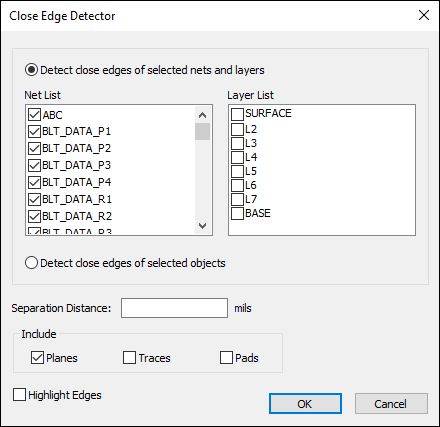
The check locates edges that are closer than the separation distance.
The check does not detect violations of the separation distance for trace gaps, trace-to-trace, or trace-to-plane.