
DDR Wizard Settings
DDR Wizard contains a detailed list of information for sources and nets. The sources are assigned to the nets as follows:
- DQ → Default PRBS
- DQS → Default Clock
- CLK → Default half-rate Clock
- ADDR → Default half-rate PRBS
- OTHER → Default half-rate PRBS
The source parameters can be partially customized. Nets can be classified into net groups based on identifier.
From the DDR Wizard, click Settings to view additional settings:
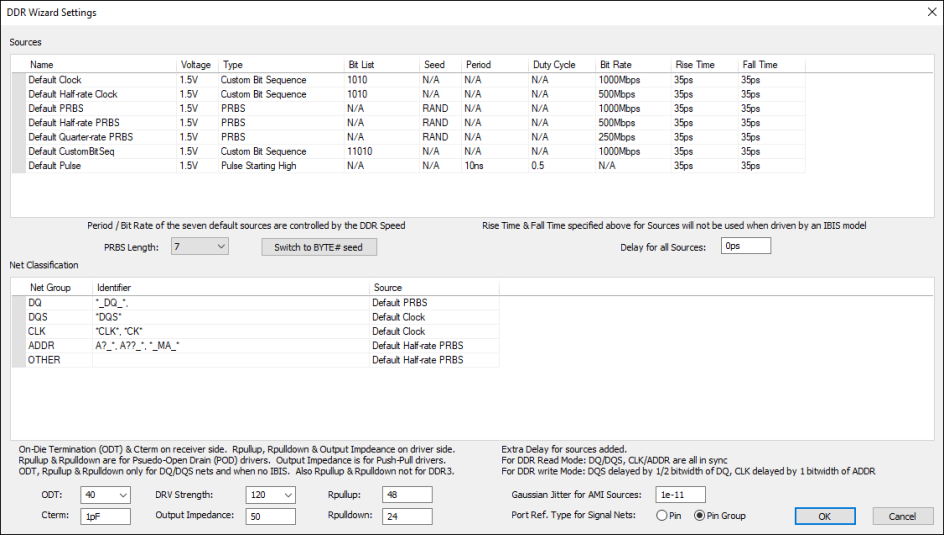
The number of Sources is locked and you cannot add or remove one. The Source Name and Bit Rate are also locked. All other fields can be updated.
PRBS Length, specified from the drop-down menu, can be from 7 bits to 31 bits.
PRBS Sources can have a seed that is an integer, BYTE#, or RAND.
- For BYTE#, the bit number within the byte lane is assigned as the seed (e.g., the first byte lane assigned to strobe DQS0 (DQ0 to DQ7) are assigned seeds 0 through 7. The next byte lane assigned to strobe DQS1 (DQ8 to DQ15) are also assigned seeds 0 through 7. The entire byte lane assigned to strobe CLK0 (ADDR0 to ADDR15) are assigned seeds 0 through 15).
- For RAND, a random seed value is assigned every time.
The Switch to [RAND / BYTE#] Seed button allows you to toggle between BYTE# and RAND for all PRBS seeds.
From the Net Classification area, only the Identifier is editable. *DQ* can be made *_DQ_* and so on. All net names are matched one-by-one with every search identifier and, if there is a match, the net belongs to the corresponding net group in the grid. An asterisk (*) can be used to match one or more of any character, while a question mark (?) will match just one of any character.
From this window, you can also:
- Sort the lists by any of the header criteria by clicking that header.
- Specify a common Delay for all Sources.
- Specify On-Die Termination (ODT) and Cterm for the receiver side.
- Specify Rpullup, Rpulldown, and Output Impedance for the driver side.
- Specify Gaussian Jitter for AMI Sources. The default is 1e-11. After simulation, you can verify that the correct setting was applied in Electronics Desktop by selecting an IBIS schematic tab, double-clicking the driver model to open its Properties window, and reviewing the information on the Jitter_Clock tab.
- Select the Port Ref. Type for Signal Nets. By default, ports on signal nets are connected to a reference Pin Group. If appropriate, change this setting to connect to an individual reference Pin.
- ODT is used only for DQ/DQS nets with no IBIS.
- Rpullup and Rpulldown are used for Pseudo-Open Drain (POD) drivers.
- POD drivers are used for DQ/DQS nets in DDR4 & above. In addition to DQ/DQS nets, the POD drivers are also used for ADDR nets in DDR5 & above.
- DRV Strength is the Drive Strength used for matching the IBIS model based on the value, if a match exists within the models in the selected IBIS component. It is used only for the driver side.
- Output Impedance is used for Push-Pull drivers.