
Computing Net Length
You can compute the lengths of all possible paths in a net and calculate the distance between any two net nodes.
To compute net length:
- From the Nets workspace, select the net(s) whose length you want to compute. Selected nets display with checked boxes.
- Click Tools. From the Inspection Tools area, click Compute Net Lengths.
Note:
Note: You will receive a warning if the signal nets contain planes.
The Net Lengths window appears.
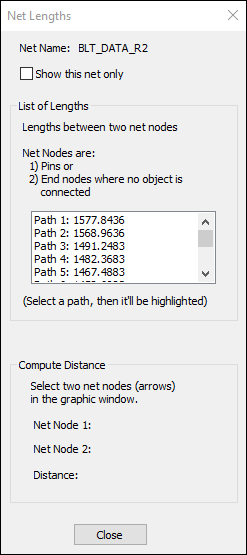
The List of Lengths displays paths in the net, with the longest net at the top. Click a listed path to highlight it in the Modeling workspace.
From the Net Lengths window, you can also compute the distance between two nodes.To do so, select two nodes in the Modeling workspace.
The path between the nodes is highlighted, and the Compute Distance field updates to display the distance between the nodes.