
Computing and Exporting Full-Wave SPICE Subcircuits
The ability to export subcircuits is an important feature of SIwave. Exporting a subcircuit allows you to perform an analysis of the structure in a circuit simulator, together with detailed nonlinear models of the drivers and receivers. You can also simulate systems comprising PCBs and packages by connecting their subcircuits together in SPICE or Spectre.
A full-wave subcircuit analysis includes full-wave effects. Frequency domain information is transferred to circuit simulators that operate in the time domain. Broadband matching of frequency responses is ensured while full-wave solution accuracy is preserved. When S-parameter data is exported to PSpice or HSPICE, an equivalent circuit is created. This circuit consists of frequency controlled voltage and current sources. When terminal S-parameter data is exported to Maxwell Spice software, a new full-wave N-port subcircuit is created.
See Full-wave subcircuits for more information on full-wave subcircuit models.
To export a solution into a full-wave SPICE subcircuit from SIwave:
- Click Results.
- From the SIwave area, select SYZ > [Simulation Name].
- Click Compute FWS Sub-Circuit.
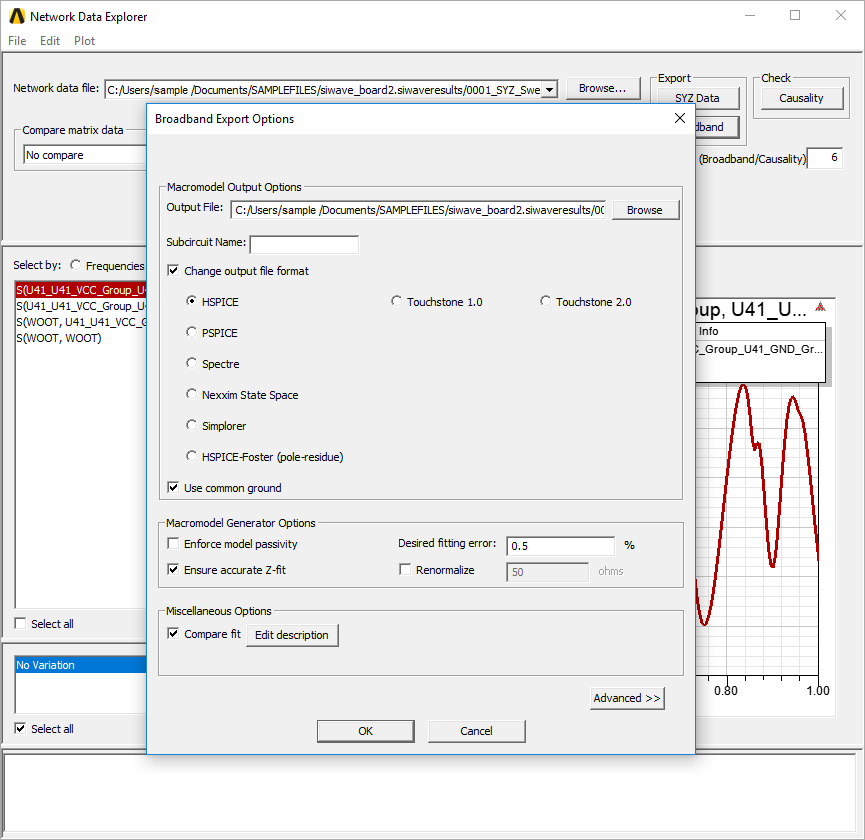
- From the Output File field, enter a name and path for your file, or use the Browse button.
- From the Subcircuit Name field, type a name for the subcircuit.
- Check the Change output file format check box. Then use the radio buttons to select your appropriate SPICE file format. The default is HSPICE.
- If appropriate, select Use common ground.
- Use the check boxes to select your appropriate passivity, Z-fit, and renormalization options. For more information on these options, see Exporting Macro Model.
- Click Advanced>> to view additional options:
- Passivity Options
- Column Fitting Options
- State Space Fitting Algorithm
- Enable Relative Error Tolerance
- Enforce Causality
- For more information on these options, see Exporting Macro Model.
- Click OK.
ndExplorer opens, and the Broadband Export Options window appears.
A SPICE file based on the geometry of the planes and added circuit elements exports to the specified location.
For more information, see S-Parameter Technical Notes.