
Adding Solderballs to a Package
Solderballs connect a BGA type package to the PCB at a designated reference designator location.
To create a solderball:
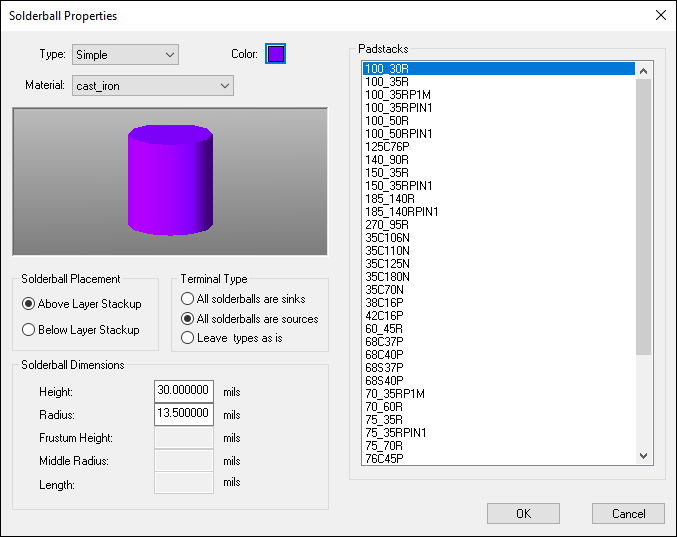
- Click Home > Solderball Properties.
- From the Padstacks area, select a padstack to define solderballs.
- From the Type drop-down menu, select Simple, Complex, or Oblong. The Solderball Dimensions section updates to reflect required fields.
- From the Material drop-down menu, select a material for the solderball.
- Click the Color swatch to select a color for the solderball(s). The default is gray.
- From the Solderball Placement area, use the radio buttons to place the solderball either Above Layer Stackup or Below Layer Stackup.
- From the Terminal Type area, use the radio buttons to set solderballs as sinks or sources globally, or to leave types as is.
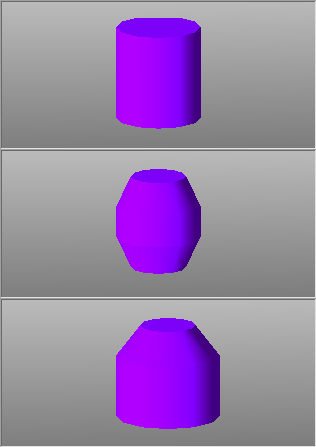
- From the Solderball Dimensions area, enter the applicable dimensions, in mils. As you make changes, the new shape of the solderball previews in the window. A simple, complex, and oblong solderball are shown below.
- Click OK.
The Solderball Properties window appears.
Solderballs are added to every instance of the specified padstacks in the layout.