
Using the Impedance Wizard
The Impedance Wizard displays by default when SI Xplorer is opened.
If it has been closed, select View > Toolbars and Docking Windows > Reset Workspaces. Then, ensure the Impedance Wizard tab is selected:
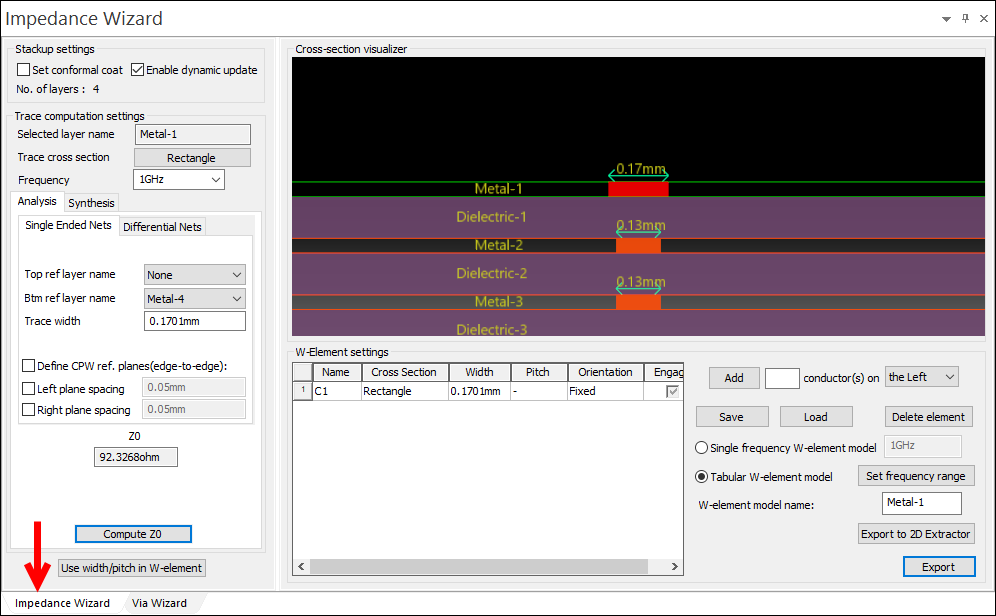
After you have configured stackup layers, the Impedance Wizard allows you to:
- Calculate Impedance
- Calculate Differential Impedance
- Calculate Trace Width and Pitch
- Perform W-element Analysis
Additionally, calculations made using the Impedance Wizard can be used to:
Note:
By default, Enable Dynamic Update is selected in the Impedance Wizard.
When any change is made in the Layer Stackup window:
- The design updates.
- Impedance and differential impedance are recalculated.
- W-element plots are recalculated and replotted.
To disable these recalculations, deselect Enable Dynamic Update.