
Fixed vs. Non-Fixed Variables
By default, both Project variables and Design variables are included in the list of variables that index solution data. As a result, they are visible when selecting data to be displayed in plots.
However, if you define a variable as fixed, it is not swept and will not index solution data. Consequently, defining variables as fixed can speed up simulation—particularly if there are many variables to simulate.
To define a variable as fixed:
- Open the Properties window for either Project or Design variables.
- Clear the Sweep check box next to the variable you want to be fixed.

- If a Sweep check box is selected (default) the corresponding variable is NOT fixed.
- If a Sweep check box is cleared, the variable is fixed.
Non-Fixed Variable Sweeps
When setting up a sweep, the Setup window contains a list of variables being swept.
To add a non-fixed variable sweep:
- Click Add.
The Add/Edit Sweep window appears.
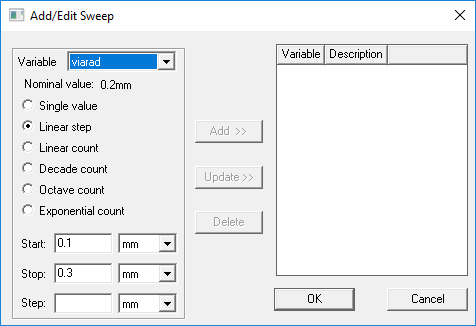
- Use the Variable drop-down menu to select a non-fixed variable.
- Select the desired settings and click Add.
- Click OK to close the Add/Edit Sweep window.
- Click OK to exit the Setup.
Orphaned Sweeps
If you create a simulation setup that contains a sweep of a variable, and then subsequently clear the variable's Sweep check box, the variable becomes fixed and, as a result, its sweep is "orphaned." The sweep is removed from the setup and the simulation runs as if the sweep did not exist.
- When you close the Properties window, a warning message is added to the Message Window for each orphaned sweep.
- If you edit an orphaned variable in the Properties window and reselect its Sweep box, the orphaned sweep will be restored to the setup list.
- If you double-click a setup that contains orphaned sweeps, a pop-up dialog box asks if you want to delete the orphaned sweeps. If you respond Yes, all orphaned sweeps are deleted when the Properties window is closed. Even if you reselect a Sweep check box, its orphaned sweep will NOT be restored. This action is undoable.
- Orphaned sweeps are not written to disk when the project is saved, so once you save a project and close it, any orphaned sweeps are permanently lost.