
Viewing Convergence Data in Q3D Extractor
To view convergence data:
- From the Project Manager, right-click a solution setup and select Convergence.
The Solutions dialog box appears, with the Convergence tab selected.
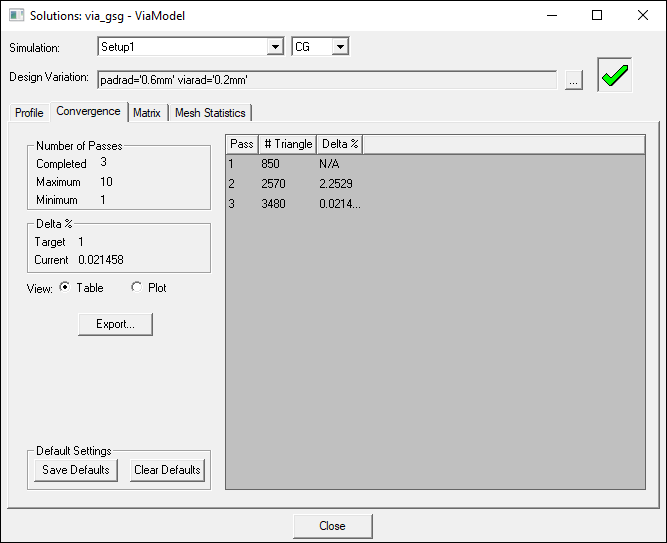
Convergence Data includes:
- Number of Adaptive Passes – during the solution process, this information includes the number of solve → error analysis → refine cycles completed / yet to be completed. After analysis has completed, only completed cycles are listed.
Note:
If the solution converged within the specified stopping criteria, fewer passes than requested may have been performed.
- Number of Triangles – the number of tetrahedra or triangles created at each adaptive pass. For magnetic materials, convergence data shows information for surface mesh triangles.
- Delta C, R, L – the change in the C, R or L matrices between two consecutive passes, depending on the requested parameters. This information is available after two or more passes are completed.
Use the radio buttons to switch between Table view (shown above) and Plot view:

Convergence Criteria in Q3D Extractor
During adaptive refinement, the convergence of the solution is monitored by reviewing the changes in the entries of the RLGC parameter matrices.
The change Delta_% is expressed as:

Where:
-
 is the entry of matrix
  at row
  and column
  , at the
  adaptive pass.
The maximum is taken across all rows and columns. A small Delta_% is usually a good indicator that the result is accurate.
By default, Q3D monitors only the convergence of the C and L parameter matrices. This convergence criteria emphasizes matrix entries with larger relative values. Small off-diagonal terms are not weighted as heavily. You can monitor the convergence of off-diagonal terms of the R and G matrices using the expression cache.