Discrete Frequency Sweeps in Q3D Extractor
A Discrete sweep generates field solutions at specific frequency points in a frequency range. For example, if you specify a range of 1000 MHz to 2000 MHz then a Step Size of 2.5, the result would be solutions at 1000, 1250, 1500, 1750, and 2000 MHz. Select the Save Fields option when setting up the points to solve if you want to save the fields (only applies to CG fields). The more steps requested, the longer it takes to complete the frequency sweep.
Choose a discrete sweep if only a few frequency points are necessary to accurately represent the results in a frequency range.
Be aware that Q3D Extractor uses the finite element mesh refined during an adaptive solution at the solution frequency. The solution frequency for the Solution Setup should be chosen taking into consideration that the well-established skin effect is assumed at that frequency; therefore, the solution frequency has to be chosen so that this assumption is true and correct. The frequency must be in the AC region for the model under analysis.
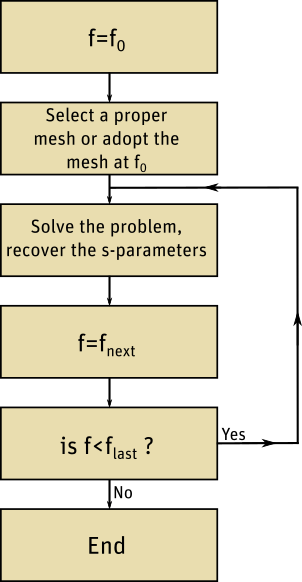
The procedure for a discrete frequency sweep is shown below, where n equally spaced frequencies are included in the sweep.