
Specifying Expressions for Adaptive Convergence
You can specify additional convergence criteria through the use of expressions and output variables.
To set expressions as Convergence criteria:
- In the Project Manager, expand Analysis.
- Double-click the setup you want to modify.
The Solve Setup window appears.
- Select the Expression Cache tab.
The Expression Cache tab lists any expressions you have added, in a table.

You can edit the Title, Context, Intrinsics, and Convergence directly in the table:
- The Context column allows you to select the original or a reduced matrix.
- The Intrinsics column contains a button
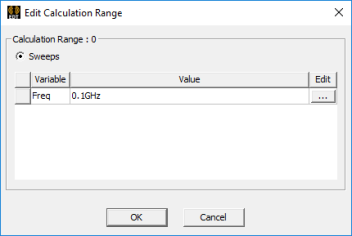
that opens an Edit Calculation Range dialog box. If the button
reads "None" you cannot edit the value. If the button shows variables,
click the ellipsis [...] in the Edit column to display a list of the
variable values that you can select.
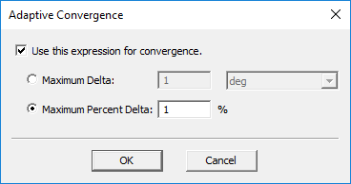
- The Adaptive Convergence column contains a button that opens the Adaptive Convergence dialog box. From there, you can specify whether to use the expression for convergence, and specify a Maximum Delta.
- Click Add.
The Add to Expression Cache window appears.
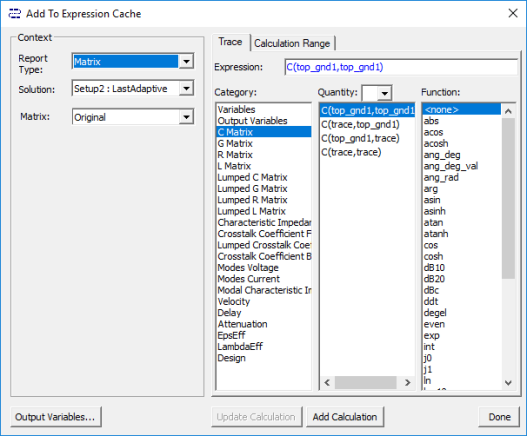
- Use the drop-down menus to specify the Context.
- On the Trace tab, select from
the Category, Quantity and Function lists to create expressions.
Your Category selection affects which Quantities and Functions display.
If you have defined one or more output variables, you can see them listed as Quantities by clicking Output Variables.
- On the Calculation Range tab, you
can view and edit the values of available sweep variables.
For example:

- When you are finished adding expressions, click Done.
- Click OK to exit the Solve Setup window.