
Setting Material Thresholds in Q3D Extractor
Materials thresholds tell Q3D Extractor how to handle conductive and magnetic materials.
The conductivity thresholds are used while identifying nets to determine which objects are considered conductors. Objects with conductivity equaling or exceeding the threshold are considered to be conductors, and those with lower conductivity are considered to be non-conductors. Materials that fall between the two thresholds are treated as normal conductors that can carry current throughout the volume of the material.
To set material thresholds:
- Click Q3D Extractor > Nets > Set Material Threshold.
The Set Material Thresholds dialog box appears.
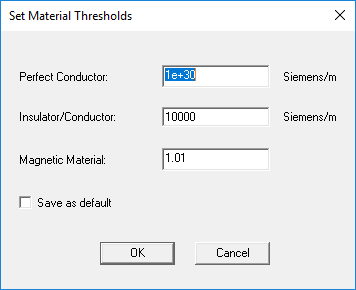
- In the Perfect Conductor field, enter a value. Any conductor having conductivity above or equal to this threshold is considered a perfect conductor in the design. These are treated as having infinite conductivity and surface current only.
- In the Insulator/Conductor field, enter a value. Any object having conductivity equal to or less than this conductivity is considered an insulator in the design. These are treated as having no conductivity and no current carrying capability.
- In the Magnetic Material field, enter a value. Any object having permeability equal to or greater than this is considered a magnetic object in the design.
- If desired, select the Save as default check box to make these settings your default.
- Click OK.
The material thresholds are applied.