
Setting Resistance and Inductance (RL) Analysis Parameters in 2D Extractor
To set up a Resistance and Inductance (RL) analysis, first add a solution setup.
Then, from the Solve Setup window:
- Select the RL Advanced tab.
The RL Advanced options display.
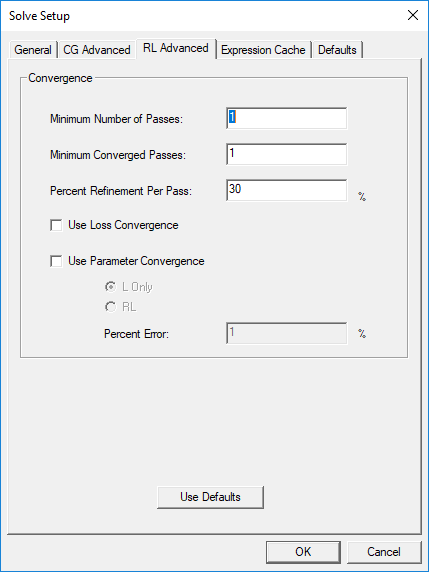
- In the Convergence area, specify the following:
- Minimum Number of Passes – the minimum number of mesh refinement cycles. 2D Extractor will not stop analysis until after this number of passes has been completed.
- Minimum Converged Passes – the minimum number of passes that must meet convergence criteria before the adaptive analysis will stop.
- Percent Refinement Per Pass – determines how many tetrahedra are added at each iteration of the adaptive refinement process. The tetrahedra with the highest error are refined. The default value is 30%.
- Use Loss Convergence – select to use loss in the convergence criteria.
- Use Parameter Convergence – select to use RL matrices in calculating convergence. Parameter convergence is determined based on the values of previous pass matrix and the current matrix. The maximum delta of a matrix entry is calculated by comparing entries of previous matrix and current matrix. The final delta is given by: Final delta (%) = 100 X (maxdelta / max value).
If the final delta is less than the target delta, then the pass is considered converged with respect to parameter convergence.
Select L Only for a lossless matrix, or RL for a lossy matrix.
- Percent Error – the desired solution accuracy. Smaller values produce more accurate but slower solutions; larger values produce less accurate but faster solutions.
- Click OK.
Note:
Epsilon is assumed to be zero for all objects in the design since displacement current terms (omega * epsilon) are not included during the simulation.