
Setting Capacitance and Conductance (CG) Analysis Parameters in 2D Extractor
To set up a capacitance and conductance (CG) analysis, first add a solution setup.
Then, from the Solve Setup window:
- Select the CG Advanced tab.
The CG Advanced options display.
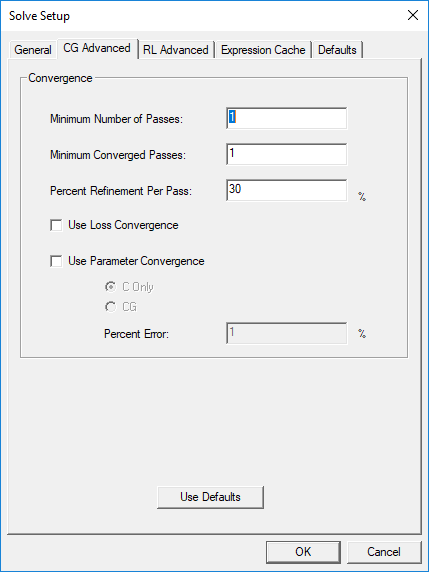
- In the Convergence area, specify values for the following:
- Minimum Number of Passes – the minimum number of mesh refinement cycles. 2D Extractor will not stop analysis until after this number of passes has been completed.
- Minimum Converged Passes – the minimum number of passes that must meet convergence criteria before the adaptive analysis will stop.
- Percent Refinement Per Pass – determines how many tetrahedra are added at each iteration of the adaptive refinement process. The tetrahedra with the highest error are refined. For example, entering 10 causes the mesh to increase approximately 10 percent each pass. If your mesh consisted of 1000 elements, the tetrahedra or triangles would be refined so that 100 new elements are added to the mesh. The default value is 30% and you can you generally accept the default value.
- Use Loss Convergence – select to use loss in the convergence criteria.
- Use Parameter Convergence – select to use CGRL matrices in calculating convergence. Parameter convergence is determined based on the values of previous pass matrix and the current matrix. The maximum delta of a matrix entry is calculated by comparing entries of previous matrix and current matrix. The final delta is given by: Final delta (%) = 100 X (maxdelta / max value).
If the final delta is less than the target delta, then the pass is considered converged with respect to parameter convergence.
Select C Only for a lossless matrix, or CG for a lossy matrix.
- Percent Error – the desired solution accuracy. Smaller values produce more accurate but slower solutions; larger values produce less accurate but faster solutions.
- Click OK.