Using Reduce Matrix > Float at Infinity
The Float at Infinity reduction lets you model the case where the charge at infinity is zero, causing the potential at infinity to float, enabling you to use a local ground as a reference.
When computing capacitance, Q3D Extractor uses the voltage at infinity as a reference, and assumes that this voltage is equal to zero. This implies that the charge inside the problem region is balanced by the charge at infinity—that is, that there is charge induced at infinity.
However, in some cases, you may want to use a grounded net in the model as a reference. To do this, Q3D Extractor changes the capacitance values to reflect a local reference—modeling the case where no field lines leak from the solution region. The potential at infinity is not fixed at zero, and depends on the voltages inside the model.
To define a capacitance matrix with a floating voltage at infinity:
- In the Project Manager, select either the original matrix or a previously reduced matrix.
- Click Q3D Extractor > Reduce Matrix > Float at Infinity.
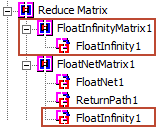
The Project Manager displays the floated matrix either as a top-level matrix or under a previously reduced matrix: